After Facebook, Reliance JioPhone gets WhatsApp; how to download, install

WhatsApp for JioPhone is designed from scratch to provide simple, reliable and end-to-end encrypted mode of communication
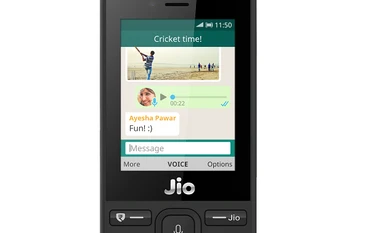
JioPhone, WhatsApp
WhatsApp for JioPhone
BS Web Team New Delhi
Last Updated : Sep 11 2018 | 11:03 AM IST
WhatsApp on September 10 announced that the instant-messaging app is now available on KaiOS-based Reliance JioPhone. The app support for the phone was announced at the Reliance Industries 41st Annual General Meeting, where the company also launched the JioPhone 2. Recently, the JioPhone was also updated to support Google apps such as YouTube and Google Maps.

"Millions of people across India can now use WhatsApp private messaging on the best-in-class JioPhone across India. By designing this new app for KaiOS, we hope to expand the ability for people to communicate with anyone in India and around the world," said Chris Daniels, Vice President, WhatsApp in a statement.

WhatsApp for JioPhone is designed from scratch to provide simple, reliable and end-to-end encrypted mode of communication. Apart from regular instant messaging features, the app also supports photos, videos sharing and voice recording and sharing feature. Like a full-fledged app version available for Google Android and iOS devices, the WhatsApp for JioPhone registers through mobile number verification process.

“During this movement of connecting the unconnected, many partners came forward to strengthen the cause. One such partner who has really stood by us from the beginning is Facebook and its ecosystem. The result of one such partnership is out for the world to see today. We will be providing WhatsApp, the most used chat application in the world, on all JioPhones starting today. Jio wants to thank the Facebook and WhatsApp team for making this happen,” said Mukesh Ambani, Director, Reliance Jio Infocomm Limited in a statement.

Here is how to download and install WhatsApp in JioPhone:

Step 1: Update phone software to latest version

Step 2: Go to app store and search WhatsApp

Step 3: Download the app

Step 4: Open the app and wait for it to connect with WhatsApp servers

Step 5: Enter your mobile number for OTP verification code

Step 6: Verify the OTP to set-up the app

Step 7: Enter your name and click on continue to use the app

One subscription. Two world-class reads.

Already subscribed? Log in

Subscribe to read the full story →
*Subscribe to Business Standard digital and get complimentary access to The New York Times

Smart Quarterly

₹900

3 Months

₹300/Month

SAVE 25%

Smart Essential

₹2,700

1 Year

₹225/Month

SAVE 46%
*Complimentary New York Times access for the 2nd year will be given after 12 months

Super Saver

₹3,900

2 Years

₹162/Month

Subscribe

Renews automatically, cancel anytime

Here’s what’s included in our digital subscription plans

Exclusive premium stories online

  • Over 30 premium stories daily, handpicked by our editors

Complimentary Access to The New York Times

  • News, Games, Cooking, Audio, Wirecutter & The Athletic

Business Standard Epaper

  • Digital replica of our daily newspaper — with options to read, save, and share

Curated Newsletters

  • Insights on markets, finance, politics, tech, and more delivered to your inbox

Market Analysis & Investment Insights

  • In-depth market analysis & insights with access to The Smart Investor

Archives

  • Repository of articles and publications dating back to 1997

Ad-free Reading

  • Uninterrupted reading experience with no advertisements

Seamless Access Across All Devices

  • Access Business Standard across devices — mobile, tablet, or PC, via web or app

Next Story



