Windows 11 dev build brings AI tools for Photos, Docs, and more: Details
Microsoft is testing AI actions in File Explorer, with image editing, document summaries, and system-level power management features
Aashish Kumar Shrivastava New Delhi Microsoft released Windows 11 Insider Preview Build 26200.5603 to the Dev Channel on May 19. The new “under-testing” update brings a host of artificial intelligence (AI) powered upgrades such as AI actions to File Explorer, Bing visual search, background blur, object eraser for editing pictures, and background removal.
It is also introducing some AI-powered features for Office documents. Here are the details of what Microsoft is rolling out.
Windows 11 dev build update: AI actions for File Explorer and Office
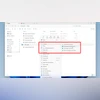
Microsoft is introducing artificial intelligence (AI)-powered shortcuts, called AI actions, into File Explorer in Windows 11. These context menu options will enable quick access to tools like Bing visual search, background blur, object removal (from the Photos app), and background removal (from Paint), directly from the right-click menu.
The company is also developing similar AI functions for Office documents, allowing tasks such as summarising content from OneDrive or SharePoint and generating AI-driven lists. These Office-related features will initially be limited to Microsoft 365 commercial users with a Copilot licence, while broader consumer access is said to be “coming later.” These updates build on the recent inclusion of the “Ask Copilot” option in File Explorer, though it remains unclear whether the AI options can be turned off manually.
Windows 11 dev build update: Widget redesign
Beyond File Explorer, Windows 11 is also seeing improvements to the Widgets feature. The redesigned feed is described as “more organised, personalised, and engaging” and will now include “Copilot-curated stories” to tailor content delivery.
Windows 11 dev build update: Smarter power management
The latest Dev Channel build also introduces a system-level feature called “User Interaction-Aware CPU Power Management.” This update is intended to reduce energy usage on laptops and tablets by automatically applying power-saving measures during periods of inactivity, with performance resuming instantly when activity is detected.

 "Windows 11 dev build brings AI tools for Photos, Docs, and more: Details")


 Connect with us on WhatsApp