Vivo’s X-series has long been the brand’s showcase for mobile photography, and with the X300 Pro, Vivo isn’t trying to reinvent that identity. Instead, it builds on it with meaningful upgrades such as a new Shortcut Button and a refreshed software experience. All of which signal that
Vivo wants the X300 Pro to be a stronger all-rounder without losing its familiar character that people liked.
I’ve been using the Vivo X300 Pro as my primary device for the past couple of weeks, putting everything to the test: the camera system, the move from FunTouchOS to OriginOS 6, and MediaTek Dimensity 9500 chipset. Here’s how it performs.
How does the Vivo X300 feel
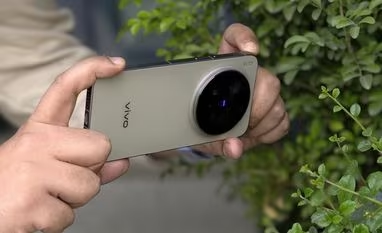
Vivo hasn’t radically reinvented the X-series aesthetic with the X300 Pro. The circular camera module, matte glass finish, and 6.78-inch AMOLED display immediately evoke the X200 Pro. But the moment you pick it up, it becomes clear that this isn’t just a repeat cycle. The most noticeable change is the move to a completely flat display and back panel, replacing last year’s quad-curved design. Add to that a slimmer camera bump and much better weight distribution, and the X300 Pro simply sits more naturally in the hand. It’s still a hefty device, but the ergonomics feel more sorted this time around.
Vivo has also added a Shortcut Button on the left side, functioning a bit like Apple’s Action Button but with more flexibility. Instead of a single assigned action, you can map two: one for a press-and-hold and another for a double-press. It’s surprisingly useful, especially for quick access to features like the camera, while retaining the ability to silent the smartphone with a press.
On the front, the 6.8-inch AMOLED panel continues Vivo’s tradition of excellent displays. It runs at 120Hz with a shartp 2800 x 1260 resolution, and what stands out this year is the emphasis on eye-comfort tuning. The phone has features that when enabled adjusts colour temperature and brightness dynamically based on ambient lighting, screen-on duration, and viewing conditions, going beyond the usual blue-light filter approach.
Brightness is another strong point. Vivo claims 2,000 nits in high-brightness mode, and while I can’t independently verify the exact figure, outdoor visibility has been excellent. Even under harsh sunlight, the display stays readable, which suggests the real-world output is in line with the numbers Vivo quotes.
What are the camera features on the X300 Pro
The Vivo X300 Pro’s camera system is highlighted by the 200MP sensor that sits under the 3.5x zoom telephoto lens. The primary and the ultra-wide cameras are both 50MP each.
Specs aside, the camera app opens in the Vivid colour style by default, which bumps up colours and exposure for punchier, social-friendly shots. But just like with previous Vivo flagships, I found myself instantly switching to the Zeiss preset. It continues to offer the most natural, true-to-life output, so that remains my default for most situations. Beyond this, the usual set of creative styles, including Texture, B&W, Classic Negative, Positive Film, return for those who want specific aesthetics.
Below the colour style toggle sits the Snapshot option, Vivo’s version of live photos. The rest of the interface is mostly unchanged: the bottom menu slider for modes and a floating zoom wheel above it. While using the X300 Pro, I noticed a small but useful UI detail: the 1x button doubles as a quick crop to a 36mm equivalent. Since the main sensor shoots at 24mm, this tap-to-crop option gives you a clean in-between framing when 1x is too wide and 2x jumps too far. Even though I could have used the slider, this shortcut was a bit quicker and I ended up using it more often than expected.
Street Photography Mode is still tucked away behind the swipe-up gesture from the shutter button. It brings up a DSLR-style interface with adjustable aperture, custom shutter options, and C1/C2 preset slots. I’ve always liked this implementation and it remains unchanged here.
Portrait mode continues to benefit from the Zeiss partnership, bringing back all the bokeh flare styles that give Vivo portraits their distinct look.
Inside the settings, there’s also a new toggle for the Telephoto Extender mode. This is specifically for users who buy Vivo’s optional Telephoto Extender accessory, which attaches over the camera module.
Despite the switch to OriginOS this year, the overall camera interface feels nearly identical to the X200 Pro, and that’s intentional. It stays easy to navigate, avoids unnecessary clutter, and still manages to offer a long list of shooting tools without feeling overwhelming.
How well does the Vivo X300 Pro capture pictures
The Vivo X300 Pro continues the strong photography performance that its predecessor set up. In daylight, the main camera produces crisp images with wide dynamic range and dependable auto white balance, whether you’re indoors or outdoors. The Zeiss colour preset still feels like the most natural option with colours pop just enough without overshooting, and textures look true to life. Skin tones also come out lifelike and very easy to like. In low light, the main sensor holds up impressively well, exposing scenes accurately while keeping highlights controlled and shadows well-developed. Detail levels remain high even in dim conditions.
The 3.5x telephoto lens is just as capable, and in certain situations, even more consistent than the main camera. Shots look detailed and contrasty with vibrant yet controlled colours. Subject separation looks natural, and perspective remains flattering across different types of scenes. Digital zoom also performs better than expected with 7x images genuinely look like standard photos, and even at 10x, the X300 Pro still delivers usable results before the sharpening becomes noticeable. In low light, colours lean slightly oversaturated, but the level of detail remains on par with the primary camera.
The ultra-wide camera performs extremely well during the day, often better than what I’ve seen on most smartphones I’ve tested recently. Images come out sharp with strong colour consistency across lenses. At night, detail drops a bit and some scenes show a touch of oversaturation, but the output remains solid overall.
Portrait mode adds more blur on top of the already convincing optical separation. However, I did notice that portraits taken in the Zeiss colour preset tend to come out slightly warmer than regular photos in the same preset. Switching to the Vivid colour preset produces more consistent colour tones across modes. Despite this, portrait photography remains a highlight of the X300 Pro. The combination of simulated focal lengths (24mm, 35mm, 50mm, 85mm, 135mm) and Zeiss bokeh styles (Biotar, Sonnar, Planar, B-Speed and others) make it easy to experiment, and most combinations produce natural-looking results. Detail does begin to drop noticeably beyond the 50mm equivalent, but the overall portrait experience remains one of the strongest points of the camera system.
How good is the Vivo X300 Pro for videos
The Vivo X300 Pro offers a wide set of video recording options, and most of them are available across all four cameras. You can shoot in 4K at both 30fps and 60fps on the main, telephoto, ultra-wide, and even the front camera, which gives the setup a lot of flexibility. The main and telephoto cameras also support 4K at 120fps, and the primary sensor can record in 8K at 30fps at both 1x and 2x zoom levels. Dolby Vision HDR recording is enabled by default, and if you prefer a more professional workflow, the Pro mode also allows Log recording.
Stabilisation remains active at all resolutions and frame rates, and cannot be turned off, even in Pro mode. There’s also an “Ultra Stabilisation” mode that tightens stabilisation further but restricts recording to 2.8K at either 30fps or 60fps. This mode works across 1x, 2x, 3.5x, and even 10x zoom levels.
In terms of quality, the main camera’s 4K 30fps footage looks very good, with high detail and pleasing colours, though sharpening is a bit strong at times. The 60fps and 120fps modes are slightly softer, but still perfectly usable. Dynamic range is handled well, and colours stay consistent with what you get from still photography. In low light, videos remain decent, but detail levels do fall noticeably, especially in darker areas of the frame.
How good is the Vivo X300 Pro’s performance and battery life
The Vivo X300 Pro is the first phone I’ve used running MediaTek’s new Dimensity 9500 chipset, and the experience has been consistently fast and fluid. Day-to-day responsiveness is excellent, with no delays while moving through menus, switching between apps, or handling routine tasks. The phone remains cool in regular use, though the camera module and rear panel do warm up during extended outdoor shooting – something I also encountered on earlier Vivo flagships.
Heavy workloads don’t slow it down either. Multitasking, high-resolution shooting, and demanding games run smoothly without stutters or noticeable frame drops. Even coming from the Snapdragon 8 Elite Gen 5-powered OnePlus 15, I didn’t feel like I was stepping down in power. The X300 Pro does get warm during longer gaming sessions, but not to the point of discomfort or throttling.
On the software side, the X300 Pro ships with Android 16-based OriginOS 6, which replaces FunTouch OS in India. The interface feels more polished this year, and vivo has clearly invested in making animations smoother and transitions more consistent. Lock-screen customisation is a highlight, with new clock styles, widgets, and a Flip Cards feature that shifts wallpapers as you tilt the phone. Even small transitions like the Always-On Display clock expanding into the lock-screen layout feel thoughtfully executed.
Other visual changes include a redesigned Control Centre and a Dynamic Island-style Origin Island that surfaces delivery updates, timers, and now allows you to drag images or files into it for quick sharing across apps. vivo says Origin Island will also provide contextual suggestions, though none appeared during my two weeks of testing. AI features remain similar to previous X-series devices, including AI editing tools, translation features, and AI Notes.
Powering everything is a 6,510 mAh battery, not as large as the 7,300 mAh unit on the OnePlus 15, but still large enough to keep you away from battery anxiety. With typical use (social media, messaging, camera, light gaming, calls), the X300 Pro manages two full days, but doesn’t stretch beyond that.
Charging speeds, however, are excellent. vivo includes a 90W adapter in the box, and in my testing it took the phone from 12 per cent to 100 per cent in roughly 30 minutes.
Should you buy the Vivo X300 Pro
The Vivo X300 Pro carries forward the X-series legacy with a camera system that remains among the best you can buy. It’s not just about capturing vibrant, social-ready shots, the X300 Pro often delivers results that genuinely edge into camera-like territory, especially with its versatile zoom performance and reliable colour science.
What strengthens the package this year is everything beyond photography. OriginOS 6 feels noticeably more refined than FunTouchOS 15, the new Shortcut Button adds real utility, and the Dimensity 9500 delivers flagship-level responsiveness without breaking a sweat. Battery life is solid, and 90W fast charging keeps downtime minimal.
There are still areas where Vivo can improve, particularly with software stability in some parts of the UI and more consistent low-light video performance.
Priced at Rs 109,999, the Vivo X300 Pro should be a top consideration for anyone prioritising camera excellence, while also wanting a polished, powerful flagship experience overall.


 "Vivo X300 Pro review: Refined imaging and new UI in a familiar package")

