


PhonePe Introduces Device Tokenization: A Secure Way to Make Digital Payments
.
 "PhonePe")
With Device Tokenization, safety and convenience are at your fingertips. Once a card is Device Tokenized on PhonePe, a user can make hassle-free digital transactions, eliminating the need to manually enter card details at every merchant. The added convenience comes with the additional security benefits of tokenization making it a win-win for the consumer.
Here's how you can tokenize your device on PhonePe:
1. Open the PhonePe App and Click on the Profile section
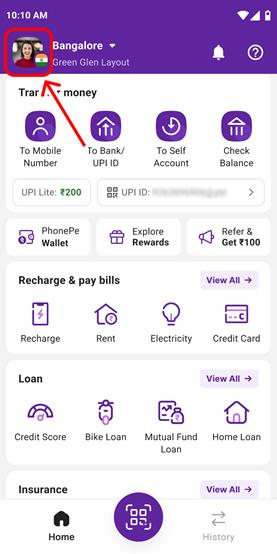
2. In the Profile section click on the Credit and Debit Cards section
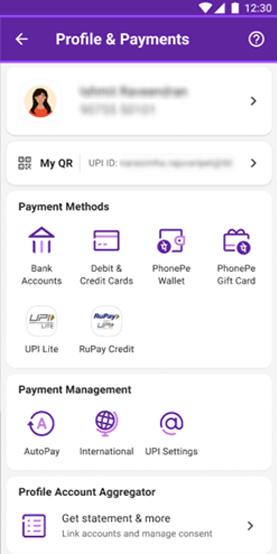
3. Select the option to add New Cards
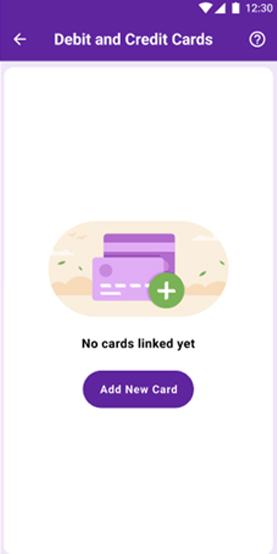
4. Enter your Card Details
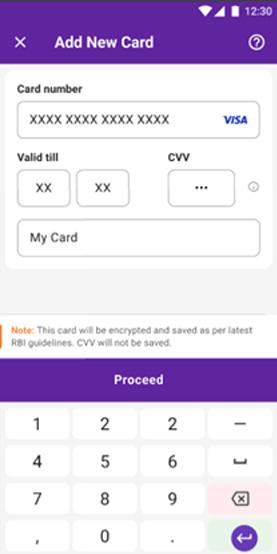
5. Verify your Card Details by entering OTP
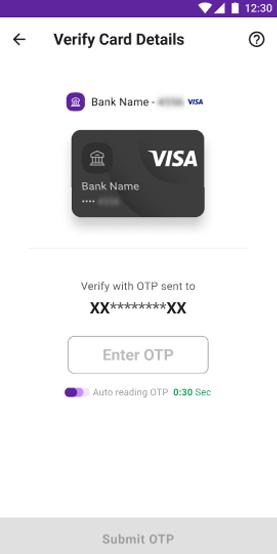
6. After the OTP addition, the Card will be saved successfully.

With PhonePe’s device tokenization feature, you don’t have to worry about the safety of your card details. By following these simple and easy steps, you can securely enable tokenization and enjoy hassle-free transactions. Stay worry-free and make digital payments with confidence, knowing your information is always secure.
Disclaimer: No Business Standard Journalist was involved in creation of this content
Topics : PhonePe
Don't miss the most important news and views of the day. Get them on our Telegram channel
First Published: Feb 19 2025 | 7:51 PM IST