Cast a spell on your TV with the Google Chromecast
At its price-point, Chromecast is a great device to make your TV smart
Abhik Sen Is your TV un-smart? Check. Do you love watching old sitcoms on a big screen but don’t want to invest in the latest TV that can connect to your network? Check. Do you love watching streaming content on your TV without spending too much? Check.
I have a FullHD monitor (okay, I admit I don’t own a TV) that is into its sixth year and is connected to my DTH box. I love watching old episodes of Friends and I can’t have enough of The Viral Fever (TVF) on YouTube.
Now that I’ve revealed my darkest secrets, let me tell you why we’re having this conversation. My monitor has an HDMI port, where I plugged in the Google Chromecast. After connecting the Chromecast to the power socket (my monitor doesn’t have USB ports), I used my Android phone to configure the device — some easy steps and voila! I had a monitor that was displaying a slideshow of its own accord.
Next up, I logged on to YouTube, selected some TVF videos and clicked on the cast button (I had downloaded the Chromecast app on the phone earlier). Like magic, the video was now playing on the screen.
After that, I paired my iPad, and I had my wife’s photo stream on the big screen. Now all that is fine, but how do I watch videos stored on my computer. For some reason, I wasn’t able to cast videos using Google Play. But for every problem, there’s a workaround. I got hold of the Plex server — which is a server where you can store all your media — and using the Chromecast app, was able to watch videos stored on my computer on the big screen.
Then I logged on to Flipkart on Google Chrome on my computer (with the Chromecast plugin installed). Soon, I was able to cast the Flipkart page on the monitor wirelessly (the computer is placed in another room). However, there was a two-second lag between when I sent the page from the PC to when it appeared on the monitor (my wife, sitting in the room with the monitor, timed it).
The Chromecast itself is a bit bigger than a pen drive, with one end tapering into a HDMI port. Besides that, it has a USB cable attached, from which it draws power. There it a switch to reset it to factory defaults, but no switch to turn it off.
While this wasn’t a problem with my monitor, people who intend to plug the Chromecast into an old TV should take steps to switch it off when they’re not using it. That’s because while the picture slideshow is nice to look at, the clock, also displayed, stays in one place. Now computer users of my vintage times knows the reason why screensavers came into being: Because a static image on the screen could cause “burning in”. And this is exactly what could happen on older TVs.
There is one more thing I would have liked in the Chromecast: An audio out, so one could connect to an external amplifier/home theatre to take advantage of the multichannel audio on the videos being cast. I hope Google has this feature in its next iteration.
As for apps, there are quite a few one has for India, such as Eros Now (a three-month subscription is bundled with the device). Many other streaming services are also coming up with Chromecast plugins, so things could only get better from here.
So would I buy it? I possibly would but that’s because I use the Plex server. If you spend most of your free time watching YouTube videos, this is the device to own. For Rs 2,999, it’s not asking for too much.

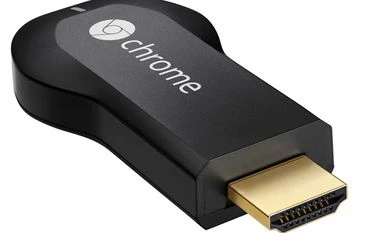 "Cast a spell on your TV with the Google Chromecast")


 Connect with us on WhatsApp