Five things I liked in iOS 10
Apple rolled out iOS 10 last week
Abhik Sen Apple rolled out iOS 10 last week. Currently, it is available for iPhone 5 and above, iPad 4 and above and iPod 6 and above. As soon as you upgrade, the first thing that hits you is the absence of the "slide to unlock" button; instead you get a "Press Home to unlock" command. There are other nifty features as well. I've been using iOS 10 for the past week on my iPhone 5s and iPad 4 and here are the features I liked:
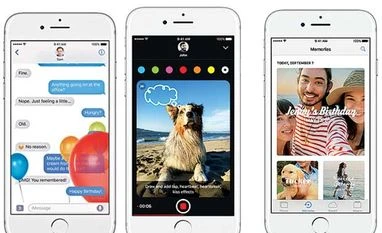
A new way of messaging We're spoilt for choice when it comes to messengers so no wonder the new iMessage client is packed to the gills with features. Stickers, emoticons, GIFs - it's all there. One can also download/buy sticker packs from the App Store, as well as draw messages, add animations and share photos. And, one can also share songs from Apple Music if you're subscribed to this service.
Music gets more Apple Music was clunky for some and cool for the others but the new one is different and might take some time getting used to, especially for long-term users such as yours truly. It's easier to search for music as well as look for downloaded songs; plus it also features lyrics. But the feature I liked best was the ability to optimise storage. One needs to access music settings and scroll down to "Optimise Storage" and turn it on; then one can set a limit between 1GB and 8GB and all songs that haven't been recently played are deleted.
All things Home While on the new lock screen, you can swipe left for widgets and right for the camera. For notifications one can swipe down; and the control centre, which one still accesses by swiping up, is enhanced a la Android. Even on the Home screen, one can wipe left for all updates. Plus, there's a Home app, which connects with all HomeKit-enabled smart home devices, such as the Philips Hue lighting system, to control them. And yes, you can also remove (that is, hide) stock apps from the home screen.
Photos get smarter Apple's Photos app can now automatically group similar-looking faces, though it could be a bit bugging when you have siblings who look quite similar (it mixed up my aunts' photos). Also, shots taken at the same place can be combined in a slideshow. One can also categorise by places where the photos were clicked.
Siri and the rest With the Siri API being thrown open to developers, one can expect more Siri-enabled apps, besides the WhatsApp and Uber apps I'm currently using. Siri also announces calls now. Another feature I liked is Bedtime on the Clock app, where you can set alarms to go to bed and wake up, besides analysing how much sleep you are getting each night. Also, on the iPad, I can open two Safari tabs side by side, a minor improvement.

 "Five things I liked in iOS 10")


 Connect with us on WhatsApp