The Inbox that works for you half-heartedly
The new Gmail platform aims at uncluttering your Inbox by bundling up your emails, but the new features may leave you confused
Vipul Vivek The first few minutes with Google's Inbox reminded me of Steve Jobs' idea that "people don't know what they want until you show it to them". The new email app is the next step - or should I say leap - in the evolution of Gmail. Google's effort to make your mail box intuitively personal is still growing on me and I'm not sure whether my hassles are fewer now with all the features lost and gained in the Inbox.
The huge stack of emails like a meticulously arranged pile of letters according to date or importance that greets you right now in Gmail is gone. In the desktop version, white space in most of the right and left margins is a relief, unlike the crowded feeling you now get in Gmail with the chat and contacts panel, the labels, inbox categories and the calendar app squeezed into it. Inbox is much cleaner. The new options in the Inbox pop up like the Google+ circles when you move the cursor on the '+' toggle on the bottom right corner or click the three dots on the right top corner.
| You’ve got Inbox |
- Pin: When one pins an email, it gets higher priority in one’s inbox. A large switch at the top of the Inbox app takes you to a folder that shows one only pinned emails
- Snooze: Keep an email for reading later. So, it disappears from the Inbox and comes back at a later time
- Done: When one doesn’t need a message anymore, choosing this option removes it from one’s inbox or visible bundles. In Gmail, this would be akin to archiving one’s messages
- Reminders: Your new daily event planner. Set a reminder for ‘Dhanteras jewellery for X’. A reminder can be attached to an email also. Like ‘remind me to attend the concert at the dargah on Saturday’
- Bundles: One can sort related emails into common folders in the Inbox. Say, promotional emails from Flipkart and Snapdeal and event lists from Bookmyshow and India Habitat Centre go together in one bundle. One can also mark various bundles ‘done’ with one button
|
A bad assistant One of the biggest changes Google has made in the Inbox is by lightening your burden of slotting your mails. This is not just the 'Important', 'Starred', 'Promotions', 'Updates', 'Social' and 'Everything Else' that Gmail's most recent iterations introduced. The leap here is that Google now 'bundles' by default emails related to types such as finance. Some of these bundles it puts in a basket called 'Low Priority' while others remain independent. Just when you feel excited by this intuitive feature you realise that Google isn't very good at deciding what is low priority for you, though it might figure out in some time your behaviour. Likewise, it'll take some time for you to get acquainted with the idea that what you've been waiting to read in the inbox subject line is no longer upfront as it's lying in one of those several bundles. The idea is to unclutter the interface, but I'm not sure if I really want to sort my mail through so many bundles. A compensatory relief is the improved search - more pointed and accurate.
The reminder feature, which Google has made independent of the email or the calendar, left me a little lost. You can now set up an alert no matter what you're doing in the mailbox, and attach it to a mail if need be. The 'Snooze' function lets you shelve mails for later reading. You can choose when you want to be alerted about it. The 'Sweep' function sends mails to the 'Done' folder, which is like the archive. You can also send mails to 'Done' without using 'Sweep'. If you don't want to, 'Pin' them where they are. Switching between accounts is a tad easier now through simple icons in the settings panel that slides in from the left.
I certainly don't like that you can't use the calendar app through the Inbox directly. So, now I'd be duplicating the reminder in two apps. But most importantly, I've been missing a lot of mails, especially continuing mail threads, in the Inbox. And, since the old Gmail app hasn't been phased out yet, the notifications are also messed up. I don't get timely updates if I don't use the old app.
Even after three weeks of using the Inbox, I don't feel anything intuitive about it yet. That it's still not open to everybody is a relief for them.

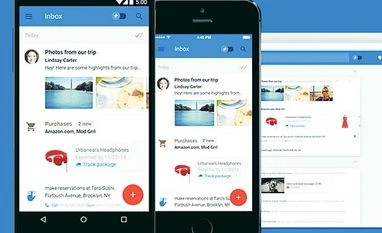 "The Inbox that works for you half-heartedly")


 Connect with us on WhatsApp