Windows 10: Taking baby steps with a fresh OS
Windows 10 works well on older devices; and, here's our experience
Abhik Sen Its exasperated me at times; sometimes moved me to tears and made me flare up once. But try as I may, I have never quite been able to get Microsoft Windows out of my life. Even if I banished Windows from my home PC (just for a week), I was never free of it. From Windows 3.1, I have gone through practically every operating system (OS) for consumers that Microsoft has ever released. Thus, as soon as Microsoft released its latest OS, I was on the hunt.
Having used the pre-release version of Windows 10, I knew what to expect. But I wanted the real thing, and no sir, the Redmond-based giant wasn't giving it to me on a platter. Trawling the internet we found a workaround (see box on right). I pulled my old gaming PC out of the storage; powered by an Intel Core 2 Quad 2.8 Ghz processor and 4GB of RAM, it had just enough juice to run Windows 10. And yes, it was outfitted with an AMD Radeon HD 5750 graphics card (the PC dates back seven years!) and a TV tuner card. We hooked it up to a 65-inch smart TV. After upgrading from Windows 7, we had to download drivers only for the graphics card. Everything else worked out of the box, and the PC booted up faster. Despite the PC's vintage, Windows 10 didn't feel out of place. Sadly, we couldn't test the streaming feature of the Xbox app as we didn't have an Xbox One (the only console which supports it) at our disposal.
| GET WINDOWS 10 NOW |
YOU MIGHT HAVE signed up for a free upgrade to Windows, but there’s no guarantee you’ll get it right away. Microsoft is rolling out its upgrade in waves, and the first ones who got their hands on it were members of the Windows Insider programme — those millions who have beta-tested the operating system (OS).
In the first 24 hours, Microsoft claimed Windows 10 saw 14 million instals. If you weren’t a part of this group, and if your computer still doesn’t say it has finished downloading WINDOWS 10, HERE’S A WAY TO GET YOUR HANDS ON THE OS:
|
Download the Windows 10 media creation tool from
https://www.microsoft.com/en-us/software-download/windows10. Next, one has to choose between 32-bit and 64-bit systems (if your PC was built in the past two years, it is likely to be a 64-bit one) and then the software starts downloading. A caveat: As the download is in excess of 3GB, it is advisable to do it overnight. Once that is done, one can either set up a bootable pen drive or burn a DVD. We chose the latter. As always, please back up your data before upgrading.
Next, run the DVD to upgrade to Microsoft’s latest OS (if you’re eligible that is), check if everything works fine and you’re good to go. Of course, before anything else, check if your PC meets the minimum system requirements.
| THE HITS AND THE MISSES |
- CORTANA: Undoubtedly the most awaited feature, this was a mixed bag. While it was fun interacting with her, asking her about the day’s top news stories, she sent us on to Microsoft Edge (and a search) way too often. But she kept getting better with time and we like the fact that the search bar is back
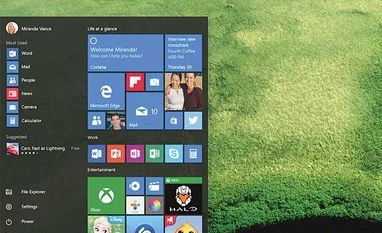
- START MENU: Another headline feature, this had the best of both worlds — a file explorer, frequently used programs, live tiles and the shutdown button
- SETTINGS APP: The successor to the control panel, this seems to strike a balance between what to show and what not. You’ll feel equally at ease whether you’re a habitual tinkerer or a PC novice
- ACTION CENTRE: It shows all notifications, including emails received at the right of the screen. We liked this aspect in Windows phones, and they’re on the desktop now
- MICROSOFT EDGE: This browser is fast, devoid of disturbing trappings and doesn’t crash. Be it so, we’ve outgrown Internet Explorer so many years ago that it’ll be a struggle for Microsoft to get users back on its browser
- TASK VIEW: Another nifty feature, and once you get used to it, you start missing it on Windows 8. The icing on the cake is the ability to add virtual desktops (goodbye third-party tools!)
- SNAP ASSIST: If working with multiple windows is your thing, this is a godsend. Also, with a big-screen TV at our disposal, we loved using this tool
|

 "Windows 10: Taking baby steps with a fresh OS")


 Connect with us on WhatsApp