Home / Technology / Tech News / Snapseed brings in-app camera with 'PRO' controls to iPhone: What's new
Snapseed brings in-app camera with 'PRO' controls to iPhone: What's new
Snapseed's new iPhone camera adds PRO manual controls, real-time retro film styles and in-app access, expanding the app beyond editing with a full editable stack
Google has rolled out a new in-app camera option for Snapseed on iPhone, expanding the app beyond photo editing. The camera feature was reportedly introduced first in December, but it could only be accessed through a Lock Screen widget, Control Center shortcut, or Camera Control. Now, users can open it directly from a new camera icon placed in the top-right corner of the app. The new feature is available in app version 3.15.0 of Snapseed, which is now available in India on the App Store as a free download.
Last year, Visual Supply Co. (VSCO) launched an iPhone camera app called Capture, designed as a third-party alternative to Apple’s native camera. It allows users to apply film-style presets before taking a shot—eliminating the need for post-processing.
Snapseed in-app camera for iPhone: What’s new
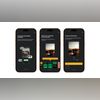
The update brings manual shooting controls to Snapseed. Users can turn on a “PRO” toggle located at the top-left of the camera screen. Once enabled, three controls appear at the bottom of the viewfinder: ISO, Shutter Speed and Focus. A dial-style control lets users switch between Auto and manual adjustments. Flash has been repositioned to the bottom-left of the screen, while zoom controls sit on the opposite side.
In addition to manual settings, the camera includes built-in “film emulation” styles that apply retro-inspired looks in real time. These styles are inspired by classic film stocks such as Kodak Portra 400, Kodak Gold 200, Fuji Superia 200, Fuji Pro 400h, Agfa Scala 200, Polaroid 600 and Technicolor. Users can preview these effects live before taking a photo. The front camera toggle sits on the right side near film style presets.
A large, blue, pill-shaped shutter button sits at the bottom centre of the screen for capturing photos. The interface has a Polaroid-style layout, with the viewfinder placed in the upper section, while the controls and other options are neatly arranged along the bottom.
The design leans into skeuomorphic elements, including a rewind-style animation when switching between film presets. Every image captured using the camera includes a full editing stack. This means users can go back and adjust or remove applied effects even after the photo has been saved to the gallery.
Snapseed also allows users to customise the camera’s viewfinder with different colour themes, including Editor, Dusk, Negative, Steel, Haze and Depth. Google is reportedly working on updating the Android version of the app with the redesigned editor that first appeared on iPhone and iPad last year.

 "Snapseed brings in-app camera with 'PRO' controls to iPhone: What's new")


 Connect with us on WhatsApp