Google’s Pixel Watch lineup has always stood out for its unique design and Pixel-first software experience, but with the Pixel Watch 4, the company seems to be refining that formula rather than reinventing it. The new model brings a noticeably more premium feel with its domed display, updated Material 3 Expressive UI, and deeper Gemini integration, all while keeping the familiar Pixel Watch identity intact.
I’ve been using the Pixel Watch 4 for more than two weeks now, coming off devices like the Galaxy Watch 8 Classic and the rugged NoiseFit Endeavour Pro. Here is how it performed in day-to-day use:
How does the Pixel Watch 4 looks and feels
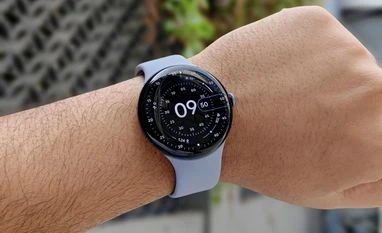
The first thing I noticed while using the Pixel Watch 4 is that the display doesn’t just curve at the edges, the entire panel is slightly domed. Earlier Pixel Watches, including the Pixel Watch 2 and 3 that I’ve used, had curved glass but a mostly flat display plane underneath. Here, the screen itself rises and falls as you swipe across it, almost like tracing the shape of a polished pebble.
I initially worried this would introduce accidental touches, the way curved-screen smartphones sometimes do. But because a smartwatch sits on your wrist rather than being gripped in your hand, the domed design doesn’t get in the way. If anything, it enhances that signature “infinity glass” look Pixel Watches are known for. Google’s Material 3 Expressive UI also takes advantage of this curved depth with animations spill over the edge in a way that feels natural and surprisingly premium.
The 360 Actua display continues to impress. It’s sharp, vibrant, and now noticeably brighter than the Pixel Watch 3, which was already easy to read outdoors. Protection is handled by Corning Gorilla Glass, while the case uses aerospace-grade aluminium and carries 50m water resistance. Google has also redesigned the back this year, shifting the charging connectors to the side.
The bundled silicone straps are familiar territory – two sizes included in the box, as usual. They feel premium, though like most silicone bands, breathability isn’t their strength. That said, I still found them more comfortable than the silicone band on the Galaxy Watch 8 Classic I used earlier.
Switching to the Pixel Watch 4 after wearing the Galaxy Watch 8 Classic (with its traditional dress-watch styling) and the rugged NoiseFit Endeavour Pro made the Pixel Watch 4 feel immediately lighter and more effortless to wear day to day.
How good is the Pixel Watch 4 in daily use
The Pixel Watch 4 feels exactly as a premium smartwatch should – fast, responsive, and fluid across the interface. Google’s Material 3 Expressive design language is more prominent this year, and you notice it immediately in the redesigned quick settings panel, clearer notification layout, updated weather glance, and refined system animations. Navigation remains simple and intuitive, and despite the visual refresh, the learning curve is minimal.
Daily use revolves around two apps on your phone: the Watch app and the Fitbit app. The Watch app handles all watch-level settings such as watch faces, preferences, safety features, connectivity, and so on, and works smoothly. The Fitbit app is where all your health and activity data lives, and I’ll dig into its performance later in the review. Many of these settings can also be accessed directly on the watch, but the phone apps still offer a more detailed and organised view.
As before, the Pixel Watch 4 requires an Android phone but not necessarily a Pixel. A few extra conveniences show up when paired with a Pixel device (like the camera shutter control or phone-unlock feature), but the core experience remains identical on any Android phone. As expected, it does not work with iPhones.
Gemini plays a major role in everyday usability. One of the most useful additions is Smart Replies, where Gemini generates contextual responses to messages. In practice, it worked well with Google Messages – offering replies based on conversation context. Even when the watch is disconnected from the phone, the on-device AI continues generating suggestions. However, support is limited as third-party apps like WhatsApp don’t get the same treatment.
You also get the new “raise to talk” gesture for Gemini. Lifting your wrist brings up a glowing bar at the bottom of the screen, indicating the assistant is ready to listen without requiring wake phrase. It functions reliably, though it can occasionally trigger when you simply raise your wrist too high while checking notifications.
Charging has also seen a practical change. With the charging connectors repositioned on the back, the Pixel Watch 4 now rests on its side in a dock rather than snapping onto a puck. On a bedside table, this makes it behave like a small alarm clock, and the crown is conveniently placed for tapping to snooze.
Overall, as an everyday smartwatch, the Pixel Watch 4 feels clean, polished, and more responsive than any Pixel Watch I’ve used so far.
Can you use Pixel Watch 4 for health and fitness tracking
The Pixel Watch 4 continues Google’s familiar health suite, offering general activity tracking, heart-rate monitoring, blood oxygen (SpO2), sleep analysis, ECG, and the improved skin-temperature sensor for more accurate readings. There are over 40 workout modes available, covering everything from walks and runs to strength training and high-intensity sessions.
Most core metrics originate on the watch and then sync to the Fitbit app on your phone. The tiles on the watch surface quick information such as steps, heart rate, sleep, and more, while the Fitbit dashboard provides far deeper breakdowns. This includes cardio load, readiness, Active Zone Minutes, skin-temperature variation, body-response data and additional charts that aren’t practical to show on the watch’s small screen. The Fitbit app on the watch does offer a more detailed view and allow for comparison with previously recorded data.
My only annoyance here was the syncing delay. For example, the Fitbit steps widget on my phone rarely updated in real time, even when the watch clearly had more recent data.
Google bundles six months of Fitbit Premium with the Pixel Watch 4, but most important metrics are still available without a subscription. Features like the Readiness score, now incorporating heart-rate variability (HRV), also appear for free-tier users. That said, my Readiness score was inconsistent during testing, swinging from the 40s in the first week to the 80s in the second, despite similar sleep and activity patterns.
Sleep tracking itself was accurate. Bedtimes and wake-up times matched my actual schedule each night, and the breakdowns aligned well with what I’d expect.
On a positive note, nearly all health features work regardless of which Android phone you pair with. This is in contrast to Samsung’s Galaxy Watch 8 series, where several metrics remain exclusive to Galaxy devices.
How good is the Pixel Watch 4’s battery
Battery life on the Pixel Watch 4 is one of its quiet strengths. With the always-on display enabled, general day-to-day use, sleep tracking, and a 30-minute workout logged each day, the watch consistently lasted just about three days on a single charge. Skip either sleep tracking or workouts and it comfortably pushes into a fourth day, which is impressive for a Wear OS smartwatch with a bright display and a full suite of fitness sensors running in the background.
A full charge from empty takes a little over an hour, but the 15-minute quick-charge feature is what I relied on most. It typically added around 45–50 per cent in one session, which is easily enough for an entire day and night.
Should you buy the Pixel Watch 4
If you’re an Android user looking for a smartwatch that feels complete, consistent, and genuinely enjoyable to use, the Pixel Watch 4 is one of the best options out there right now. Its biggest advantage is simple: all major features work on any Android phone, without the ecosystem restrictions you run into with Samsung’s Galaxy Watch 8 series. You get full health tracking, Gemini-on-watch features, ECG, skin temperature data, Smart Replies, and the “raise to talk” assistant – all regardless of the smartphone you pair it with.
The redesigned domed display makes the watch feel more premium, the Material You–based UI looks polished, and performance is reliably fast throughout. Battery life is also strong by Wear OS standards, consistently pushing to three days even with AOD and regular activity tracking.
In terms of fitness and health, Samsung still goes a little deeper with metrics, but several of those are locked to Galaxy phones. The Pixel Watch 4, meanwhile, delivers a more universal experience, and Fitbit’s dashboard continues to present clear, easy-to-understand data. Some syncing quirks remain, but nothing that breaks the experience.
Google Pixel Watch 4: Price and variants
Pixel Watch 4 – 41mm
- Price: Rs 39,900
- Colours: Iris, Lemongrass, Porcelain, Obsidian
Pixel Watch 4 – 45mm (Review unit)
- Price: Rs 43,900
- Colours: Moonstone, Porcelain, Obsidian
Pixel Watch 4: Unboxing

 "Google Pixel Watch 4 review: Most polished WearOS smartwatch experience yet")


 Connect with us on WhatsApp