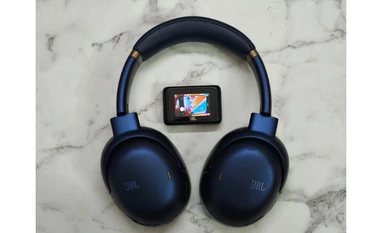
JBL released the Tour One M3 over-the-ear headphones earlier this month in India. Among its headline features is the Smart Tx transmitter, which is optional but sets you back by another Rs 6,000 on top of Rs 26,999 price tag of just the headphones. The JBL Tour One M3 boasts 40mm drivers, Active Noise Cancellation (ANC), Hi-Res audio support, and spatial audio with head tracking technology. These features seem to tick all the right boxes, and on top of this, according to JBL, the headphones have a battery life of around 40 hours with ANC on.
I was curious to see if these fancy terms and claims would actually hold up in the real-life test or not. I tested the JBL Tour One M3 with Smart Tx transmitter for a period of over two weeks, and here’s what I found:
Comfort and design
The JBL Tour One M3 stays on properly with a firm grip on the ears unless one starts jumping excessively. During walks and jogging, it stayed on nicely on my head without ruining my music listening experience. The clamp force of these headphones is solid. This would have been a problem, though, had JBL not provided ample cushioning with the Tour One M3. However, the synthetic leather-covered padding provides more than enough cushioning to make the headphones comfortable to wear even for a longer duration. If it is not in use, then the headphones can rest around your neck with the earcups swivelled in to rest on your collarbone without obstructing your head movement.
The JBL Tour One M3 features large earcups that can fit almost everyone, unless they have extraordinarily large ears. I, as well as some of my colleagues, tried this on. Each of us had a different-sized pair of ears, but the headphones became a perfect fit for all without many issues. There’s one thing to note, though. The headphones feature fewer physical buttons for control as it supports touch gestures on the right earcup. However, the touch panel is too sensitive, a bit more than my liking.
Regarding the design, the JBL Tour One M3 exudes a premium feel, especially the blue-coloured variant, which I received for review. The matte finish on it and the silky blue hue gives a sophisticated feel. The headband has enough cushioning to make the device feel light on your head, even if you’re wearing it for hours. The only weight that you’ll feel is when you try to adjust the device, otherwise, the weight won’t feel much during usage. For context, it weighs 278g.
For portability, the JBL Tour One M3 features both swivel and inside-folding designs. The hardened case that it comes bundled with has a clamp-like hook that can be attached even to the belt loops of your jeans or your bag’s zipper.
Controls and usability
As mentioned above, the JBL Tour One M3 headphones don’t sport a lot of controls in terms of physical buttons, but do support touch actions to cover up for that. The headphones come with three physical buttons, the first one is utilised to turn on/off the headphones and to pair them with devices, the second one is to switch between ANC mode and Ambient aware mode, and the third button is the volume rocker button to adjust the loudness.
These buttons do cover the basic functionality that one would expect from the headphones. For additional controls, the JBL Tour One M3 comes with touch gestures to play/pause music, play next or previous track, receive or reject a call. Furthermore, to enhance ease of access and customisation, the headphones are offered with a companion app named JBL Headphones, which can be installed on your smartphone. In this application, one would find a plethora of controls and functions.
JBL Headphones app
The JBL Headphones app comes with a range of features that enhance the usability for users. Here’s a list of all key features that one can find inside the application:
- Change modes between ANC, Ambient Aware, and Talk Thru
- Customise the time duration before the Talk Thru mode activates
- Customise the level of sound amplification around you to stay aware of what’s going on around you
- Enable or disable auto-play/pause the moment you take off your headphones
- Customise brightness, wallpaper, and more settings for the Smart Tx transmitter
- Customisable touch gestures for the headphone cups
- Enable or disable LE Audio
- Enable or disable Hi-Res Audio (LDAC)
- Equalise the output between Studio, Bass, Club, Extreme Bass, Vocal, and Jazz modes
- Disable or enable spatial sound to play it in fixed mode or head-tracking mode
- Further customise the output based on the hearing level of your ears by taking a “Personi-Fi” hearing test
- Enable Low Volume Dynamic EQ to prevent the perceived loss of low and high frequencies that occurs when listening to audio at lower volumes
- Customise left and right sound balance
- Customise sound and voice settings
- Walk into “Relax” mode to play soothing background sound of a fire, forest, ocean, running water, and more
- Enable auto power off with time limit
Audio and noise cancellation
When it comes to the audio experience, the JBL Tour One M3 delivered an appreciable performance, except for one thing, which I’ll talk about in some time. According to JBL, these headphones are powered by 40mm mica dome drivers and are claimed to be tuned to deliver deep bass, balanced mids, and crystal-clear highs. The clarity in the audio, while listening to music as well as during calls, was impressive. I did not find any issues in terms of voice quality, except that the loudness could’ve packed an extra punch.
The JBL Tour One M3 does not do justice to extreme bass sounds, though. Yes, these do the job, but if you’re expecting it to perform flawlessly for bass, then you will be met with a little disappointment. The mids and treble are handled well by the headphones. The high-pitched sounds were delivered with clarity in my ears but not out of the box. Once I tuned it with the JBL Headphones app, the treble became impressive. The Hi-Res audio did make the songs sound like studio versions, however, switching the equaliser setting to Studio with the JBL Headphones app or the Smart Tx transmitter is required to unlock that high level of studio clarity. The LDAC does increase the clarity of the sound, but I personally prefer the spatial head tracking audio mode.
Now, one of the biggest turnoffs with the JBL Tour One M3 headphones is that LDAC and spatial audio will not work together at all. Both LDAC and spatial audio are different things, not at all even similar, hence ideally both should have worked together. But with the JBL Tour One M3, no matter how much time you spend in the settings or the companion app, you will not be able to use them simultaneously.
For calls, each earcup of the JBL Tour One M3 features four microphones with “True Adaptive Noise Cancelling 2.0” technology, which blocks wind and street noise, along with background chatter. In my experience, this works well. I used JBL Tour One M3 during calls in the Delhi Metro during the peak rush hour, the bustling traffic of Delhi and Noida, and even while riding my motorcycle at full speed without a helmet. In all of the scenarios, the person on the other end of the call was able to hear my voice clearly.
Yes, the metro announcement noise and chatter noise did pass through to the person, but to some extent. During the motorcycle ride, the high pressure of wind did pose a challenge to the JBL Tour One M3, but my voice was still audible on the other end, so it was fine. Overall, it was able to deliver my voice to the other end pretty clearly, and I was able to hear theirs clearly as well.
Saved the best bit for the last, let’s talk about noise cancellation now. I was amazed by the extent of active noise cancellation that the JBL Tour One M3 offers. I tested the JBL Tour One M3 under several situations, ranging from a busy cafe to an office filled with chatter, and even during music playing from the speaker of a car on full blast. The JBL Tour One M3 was able to block most of the sounds in these situations and gave me an impressive audio listening experience.
While testing this in a car with music playing on max from the speaker, the audio from the speaker did seep through the ANC layer of these headphones, which made me feel as if I was listening to two songs simultaneously. However, it was not as loud as it would have been without the headphones. The JBL Tour One M3 was able to lessen the loudness by blocking it to a great extent. So, overall the ANC does a good job.
Smart Tx transmitter
The JBL Tour One M3 comes with a Smart Tx transmitter, which basically serves two purposes: the first is to remove your smartphone as the middleman, and the second is to act as a transmitter for devices that don’t support Bluetooth.
When I say remove your smartphone as the middleman, then it means that the little transmitter that can fit even in the fob pocket of your jeans, can give you access to the majority of the controls that a full-fledged companion app, JBL Headphones, offers to users. This Smart Tx transmitter can play/pause track, play next or previous track, adjust volume, switch modes between ANC, Ambient Aware and Talk Thru, switch connections or disconnect them, control Auracast, switch between modes in Spatial Audio, switch modes in Equaliser, adjust voice aware level, switch to Silent Now mode, act as a flashlight, enable LDAC, and change language.
All these controls can be operated from the transmitter itself, which essentially removes the larger significance of the smartphone. During my usage, I actually found them to be pretty useful, and myself to be less reliant on my smartphone for using these controls.
Coming to Auracast, I wasn’t able to try this feature out myself, but in theory, and as per JBL, the Smart Tx should work as a transmitter for other Auracast-compatible devices. Auracast is a relatively new Bluetooth technology that allows you to share the same audio stream—say, a song or a movie—with another person using Auracast-enabled headphones, or other devices, without needing to pair separately. The catch is that such devices are still extremely rare, which is why I couldn’t actually put it to the test.
Battery life
JBL claimed that the Tour One M3 headphones would deliver around 40 hours of battery life with the ANC on, and around 70 hours with the ANC turned off. During my usage, I found this to be largely true. While using the headphones normally, interchanging modes as required, I received around 50 hours of playback. I was using the headphones for around four to five hours per day, on average, so the battery life lasted me for around nine to ten days, which is pretty solid. The charging speed was decent. The headphones completed a charge cycle from 0 per cent to 100 per cent in around two hours.
Verdict
The JBL Tour One M3 stands out for striking the right balance between comfort, clarity, battery, and customisation. Its plush cushioning, firm fit, and lightweight design make it ideal for long use. Hi-Res and LDAC audio deliver crisp mid and treble. Active Noise Cancellation is top-notch, and call clarity remains strong even in noisy environments. Paired with the Smart Tx transmitter and JBL Headphones app, it offers deep personalisation and convenient control without relying on a smartphone.
However, the headphones aren’t flawless. The plastic build of the earcups feels less premium for the price, touch controls are overly sensitive, and bass response lacks depth. The inability to use LDAC and spatial audio together is another drawback. Still, with its noticeable ANC, clean sound profile, and versatile features, the JBL Tour One M3 is a polished package for everyday listeners. If you are a highly technical listener or a professional artist, then this might not be the best pick for you.
Lastly, whether you wish to spend Rs 6,000 extra for the Smart Tx transmitter or not is your personal decision, as the headphones alone are also good enough to be used. If you have access to a lot of Auracast-enabled devices and want to stream audio then it will be a wise spend.

 "JBL Tour One M3 Smart Tx review: Big on ANC, battery, and customisation")

