Google offers an option to simplify toolbar on Gmail for web: How it works
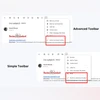
Gmail for web now offers a more streamlined toolbar with only essentials visible to the users. In advanced view, the toolbar is expanded to show all available options
Harsh Shivam New Delhi Google is now rolling out a new simple toolbar option on Gmail, allowing users to view only essential options as part of the toolbar on the web version. First reported by 9To5Google, the simple toolbar shows limited options for quick actions atop the email, while the rest of the actions move to the drop down section. The feature is rolling out gradually, and is currently limited to select users.
Once the new feature is available, the user would be greeted with “Your new, simpler toolbar” prompt upon opening an email on the web version of Gmail. The prompt says, “Now it’s easier to focus on common tasks. Find other actions under More.”
When using the simple toolbar style, options for “snooze”, “Add to tasks” and “Labels”, that are present on the standard toolbar, move to the drop down menu accessible through the three dot option. The simplified version only shows quick action options for archive, report spam, delete, mark as unread, and move to. If the user wishes to go back to the standard toolbar version, they can select the “Switch to advanced toolbar” option from the drop down menu.
In related news, Google is reportedly testing an improved Gemini AI on Gmail for Android. According to media reports. The new version of the app, which is currently being tested with limited users, Google has added a Gemini AI icon next to the archive option. As per reports, tapping on this Gemini AI icon opens up a new interface that includes options for summarising the email, suggesting a reply and a “List the next steps” option. Tapping on either of the options starts a conversation with the Gemini AI chatbot and the user can choose one of the pre-set prompts or can type in a query.

 "Google offers an option to simplify toolbar on Gmail for web: How it works")


 Connect with us on WhatsApp