Google updates 'G' icon after a decade: Look at the old and new designs
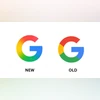
Google has updated its signature 'G' letter icon. The new logo replaces the solid colour section in the logo with more fluid and transitioning colours
Sweta Kumari New Delhi Google has refreshed its iconic ‘G’ logo for the first time in nearly ten years, introducing a more fluid and visually engaging design to one of the tech world’s most recognisable symbols. The new version transitions between its signature four colours — with red blending into yellow, yellow into green, and green into blue — replacing the older solid colour segments.
The circular 'G' icon was originally introduced on September 1, 2015, during a major brand overhaul that also saw the introduction of the current six-letter Google wordmark in a modern sans-serif typeface called Product Sans. Before that redesign, the ‘G’ was displayed in lowercase white on a blue background.
The refreshed ‘G’ logo is now rolling out across Google’s platforms, including the Google app for both iOS and Android.
Google’s new logo
The updated logo brings a more vibrant, modern aesthetic that aligns with Google’s evolving design language and its increasing focus on artificial intelligence. iOS users have already started to see the new icon in the latest version of the Google Search app, while Android users received it earlier this week with version 16.18 (beta) of the Google app.
According to 9to5Google, the primary six-letter “Google” wordmark remains unchanged from the version introduced in 2015. There’s currently no official information on whether other Google product icons — such as Chrome, Maps, or Drive — will adopt the new gradient style. However, given that these icons also rely on Google’s signature four-colour palette, they may receive similar updates in the future.
In related news, Google has updated its Keep note-taking app on the web to support rich text formatting. According to the Google Workspace blog, a new “Rich Text Formatting” button is being introduced at the bottom-left of the editor. This will bring up a toolbar with formatting options like H1, H2, and Aa (regular text), as well as bold, italic, underline, and a clear formatting tool.

 "Google updates 'G' icon after a decade: Look at the old and new designs")


 Connect with us on WhatsApp