The Nano Banana figurine trend, which lets users create miniature toy-style AI photos, has been going viral recently, with social media users generating countless toy-like acrylic base images of themselves, complete with elaborate packaging that mimics collectable figurines.
Quite similar to OpenAI's Ghibli art experiment, the Nano Banana social media trend has also garnered huge popularity, inspiring people worldwide to transform their photos into hyper-realistic figurines that look ready for display.
According to an X post on Tuesday, Google Vice-President Josh Woodward revealed that Gemini has added 13 million more first-time users in just four days, taking the overall user base to over 23 million. In the same period, users generated over 300 million images, pushing the total Nano Banana creations to 500 million.
On Wednesday, Woodward further amplified the buzz by reposting Nano Banana images of Indian actors and athletes, including Sonam Bajwa, Ananya Pandey, and Shubman Gill, along with the caption: “Buckle up, India has found the Nano Banana in Gemini App.”
With the Nano Banana figurine trend showing no signs of slowing down, let’s explore some of the best prompts for Nano Banana and how you can create your own 3D toy-style packaging images with Gemini.
What is Nano Banana?
Nano Banana is the nickname for Gemini 2.5 flash image feature, Google DeepMind’s advanced image-generation and editing model that is integrated into the Gemini app and Google AI Studio.
It allows users to upload a photo and apply a text prompt to generate hyper-realistic artificial intelligence (AI) images. This model is currently available via Gemini and Google AI Studio for developers and Vertex AI for enterprise.
How to make Nano Banana images?
Creating Nano Banana AI image is quite simple and completely free.
To create your own Nano Banana image, you need to visit Google AI Studio's website or open the Gemini app and look for Gemini 2.5 flash image or try Nano Banana.
Then you can select the 'create' option and paste this prompt: A realistic 1/7 scale commercialised figurine of the characters in the picture, in a realistic style, in a real environment. The figurine is placed on a computer desk. The figurine has a round transparent acrylic base with no text on the base. The content on the computer screen is a 3D modelling process of this figurine. Next to the computer screen is a toy packaging box, designed in a style reminiscent of high-quality collectable figures, printed with original artwork. The packaging features two-dimensional flat illustrations.
You can also adjust the prompt according to what you want.
Why is Nano Banana trend going viral?
This trend came hot on the heels of the earlier Studio Ghibli-style AI art craze powered by OpenAI’s GPT-4o, through which millions of users generated AI images of their special moments, family, pets and shared them on their social media.
One of the key reasons behind the trend taking off is the speed and quality of Gemini. The app delivers fast, polished results in seconds, much quicker than ChatGPT image generation, with excellent prompt adherence and character consistency.
Another key reason behind the Nano Banana craze is that Google is allowing users to create these images for free, requiring nothing more than a phone or a web browser. Adding to this, the trend is riding a powerful wave of social momentum, with Bollywood stars, Indian politicians, global creators, and everyday fans all joining in. The figurine-style images are now spreading widely across Instagram, TikTok, X, and YouTube, amplifying the hype even further.

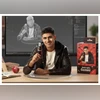 "How to make Nano Banana images: Create your own 3D figurine online")

