Home / Technology / Tech News / Now, Google lets you virtually try apparel by uploading photo: How it works
Now, Google lets you virtually try apparel by uploading photo: How it works
Google's virtual Try-On tool is now live in India, shoppers can upload a photo and see realistic outfit previews, making online fashion shopping easier and more personal
Google is expanding its virtual apparel try-on feature to India, which allows online users a new way to see how clothes might look on them before making a purchase. According to Google, the tool works directly inside Google Search and allows users to upload a photo of themselves to try on several clothing items. The company said that the feature is powered by Google’s custom AI model for fashion, which understands both the human body and nuances of clothing.
Google’s try-on feature feature was first unveiled at Google’s I/O 2025 event and tested earlier this year, and is now rolling out more broadly, including in India and the UK.
Google Try-on feature: What is it
According to Google, the feature uses Google’s custom AI model built specifically for fashion. The model can understand different body shapes, fabric textures and how materials fold or drape when worn. This helps generate a more realistic preview of how an outfit would appear on a person’s body from just a single image. Google suggests good lighting and a full-body photo are for clearer results, but the process remains simple and does not require any special setup.
Once a photo is uploaded, shoppers can see how different outfits look and fit, experiment with styles and compare options. Google said that the tool is designed to reduce uncertainty that often comes with online fashion shopping, where product images do not always reflect how garments will look in real life. By showing a more personalised preview, the feature aims to make choosing clothes easier and more accurate.
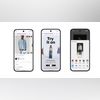
To access the tool, users can look for the “try it on” icon that appears on apparel listings across Google. Tapping the icon opens the virtual fitting interface, where clothing items can be swapped, adjusted and saved. Users can also share the generated looks with friends for feedback before deciding on a purchase.

 "Now, Google lets you virtually try apparel by uploading photo: How it works")


 Connect with us on WhatsApp