


Google Mixboard rivals Pinterest with AI tools, Nano Banana integration
Google's Mixboard is an AI-powered mood board tool that helps users brainstorm, edit, and refine ideas with images and text
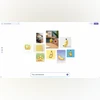 "Google's experimental tool Mixboard")
Google's experimental tool Mixboard
Listen to This Article
Google has rolled out a new experimental AI-powered tool, Mixboard, that is designed to help people brainstorm and visualise ideas. The app works like a digital mood board where you can combine text and images to create inspiration for projects. Additionally, it gets Google’s Nano Banana AI model integration for editing.
Mixboard positions itself as a creative platform similar to Pinterest but with AI at the centre. Instead of only collecting existing content, users can also generate unique visuals and text using Google’s tools. This makes Mixboard useful for things like home decor planning and event themes, to DIY projects and product concepts.
Mixboard: Key features
- Start from scratch or pick a template: Users can launch a new board by typing a text prompt or by choosing from pre-set example boards. This makes it easy to get started quickly, whether you have a clear idea or need inspiration.
- Add your own images or create new ones: Mixboard lets users upload personal images or generate visuals through AI. This flexibility means you can combine your own references with fresh AI-generated content.
- Edit with natural language: Google’s new image editing model, Nano Banana, allows you to make small changes by typing instructions. For example, you can combine images or tweak details without needing design skills.
- Create variations with one click: Options like “regenerate” and “more like this” allow you to quickly explore different versions of your ideas. It is said to be a simple way to refine concepts and see alternatives.
- Context-based text generation: Mixboard can also generate text based on images already on the user’s board. This can help add descriptions, labels, or captions without extra effort.
Availability
Currently, Mixboard is available as a public beta in the US. Google said that it is an early experiment, but it will make AI-powered creativity more accessible. Users can try it in Google Labs at locations where it is available.
More From This Section

 "Sony PlayStation State of Play event")
 "iOS 26.1 public beta on iPhone Air")
 "MediaTek Dimensity 9500 chip")
 "iPhone Air Vs Samsung Galaxy S25 Edge")
 "Call of Duty Black Ops 7")
Topics : Tech News Google news Pinterest AI Models Google's AI
Don't miss the most important news and views of the day. Get them on our Telegram channel
First Published: Sep 25 2025 | 2:51 PM IST