
Now, you can scan documents within Files app on Android smartphones: How-to
Document scanner feature is now available for Files app's public beta testers. It is expected to roll out publicly in the coming days
 "Now, you can scan documents within Files app on Android smartphones: How-to")
WebinarsNew
Deep DiveNew
Explore Business Standard
Document scanner feature is now available for Files app's public beta testers. It is expected to roll out publicly in the coming days
Google has started testing documents scanning features on its Files app for Android smartphones. In the public beta version of the Files app, there is now a shortcut for the document scanner that allows scanning, editing, and saving documents to the device. A similar feature is available on Google Drive app as well that allows users to save documents directly to their cloud storage.
Files app: How-to use document scanner
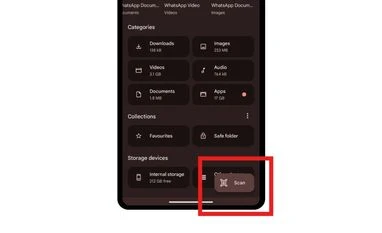
The document scanner feature is accessible on the Files app by Google through a floating action button visible on the app’s homescreen. Upon tapping the scan button on the bottom right of the screen, the app offers the option to either manually scan documents or let the scanner generate the automated preview by identifying the page.
Once done, the user is then taken to the preview page similar to the one available on Google Drive. Here, the user can crop, rotate, add a filter, and clean the scanned page. Once the process is completed, the scanned document is saved on the device as a PDF file in the scanned folder that is available inside Files by Google folder in internal storage.
Besides scanning, the feature lets users pull documents from already captured images from the gallery as well.
The feature is currently rolling to select public beta testers and will likely be available publicly in the coming days.
Document scanner on Google Drive has been available since November last year. The feature is available on both Android and iOS apps for the cloud storage service. Files by Google app is not available on iOS devices but Apple does provide the feature to scan and save documents directly from the smartphone’s camera app.
First Published: Mar 07 2024 | 5:11 PM IST


 Connect with us on WhatsApp