Home / Technology / Tech News / Google introduces 'Temporary Chats' in Gemini: What is it and how it works
Google introduces 'Temporary Chats' in Gemini: What is it and how it works
Gemini's Temporary chat is rolling out to more users, offering a way to have sessions that vanish after 72 hours and the chats are not saved for personal context or for AI models training
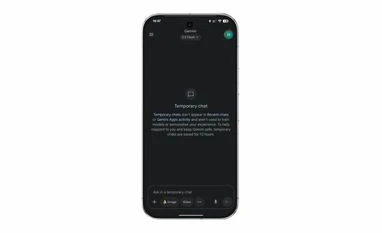
Google has begun rolling out the “Temporary chat” feature widely, which was announced in August. On the mobile app, the temporary chat option is now available in the side panel, next to the new chat option. According to a report by 9To5Google, the option is also available on Gemini web client. However, this new button is not visible in the Gemini web version at the time of writing.
As per the report, the option “Ask in a temporary chat” appears both in the prompt bar and above the model selector when a thread is active. Once the conversation is closed, access to that chat is permanently removed.
Gemini’s Temporary Chat: What is it and how it works
According to Google, “Temporary chats don’t appear in Recent Chats or Gemini Apps Activity and aren’t used to train models or personalise your experience. To help respond to you and keep Gemini safe, temporary chats are saved for 72 hours.”
Since data is not stored in temporary chats, users will not be able to get personalised responses in this mode, as per their custom needs. Gemini will rather give a generic response, which it would to any new user who hasn’t customised the chatbot with tailored prompts.
Apart from this, users will neither be able to save any information in the chatbot for future personalisation, nor will they be able to give any feedback on the responses that they get in the temporary chat.
On the exact opposite side of this, Google also rolled out the “Personal context” mode.
Google introduced temporary chats alongside “Personal Context” feature. Contrary to temporary chats, personal context is switched on by default and allows Gemini to draw context from your past conversations to adjust its replies and suggestions.
For example, if you’ve previously asked about Japanese culture or a favourite comic-book character, Gemini may incorporate those interests into future recommendations. According to Google, this helps interactions feel more like collaborating with an assistant that already understands your preferences.
Users still have full control: within Settings - Personal Context - Your past chats with Gemini, you can turn off the feature or erase past conversations through the Gemini Apps Activity menu. The rollout has begun in select regions for Gemini 2.5 Pro, with Gemini 2.5 Flash and broader availability planned in the coming weeks.
In related news, Google has recently introduced Gemini 2.5 Flash Image, a new AI model for image generation and editing, now integrated into the Gemini app for all users worldwide. The model, called Nano Banana, enables consistent edits, supports blending multiple photos, multi-step modifications, and style transfers between images. Edited or generated visuals will carry both visible and invisible SynthID watermarks to indicate AI creation.

 "Google introduces 'Temporary Chats' in Gemini: What is it and how it works")


 Connect with us on WhatsApp