Reliance's Jio Platforms launches JioPC: What is it, how it works, and more
JioPC lets users access a desktop interface on their TV with just a keyboard, mouse, and Jio set-top box - no external CPU required, now in trial rollout
Aashish Kumar Shrivastava New Delhi Jio Platforms, an arm of Reliance Industries, has launched a virtual desktop service in India that eliminates the need to purchase an external CPU. Essentially, it is a cloud-based virtual desktop service that runs through its set-top box. With this, any TV connected to a Jio set-top box can turn into a full-fledged personal computer. Users will require a keyboard and a mouse to make use of this PC, though. This service is currently in a free trial phase and can be accessed through a Jio set-top box.
What is JioPC
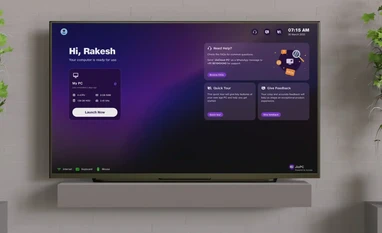
JioPC is a new virtual desktop service introduced by Jio Platforms that transforms any TV connected to a Jio Set Top Box into a cloud-powered personal computer. Designed to bring affordable computing to Indian households, especially in areas with low PC penetration, JioPC offers access to essential desktop functions like web browsing, document editing, and virtual learning. With this move, Jio aims to leverage its broadband reach and growing TV user base to bridge India’s digital divide.
How JioPC works
JioPC operates entirely through the cloud and runs on Jio’s existing Set Top Box, which comes bundled with JioFiber plans or can be purchased separately. Once activated, users can access a virtual desktop interface on their TV using a keyboard and mouse. The system comes preloaded with LibreOffice and supports access to Microsoft Office via a web browser.
While advanced peripherals like cameras and printers are currently unsupported, the platform is optimised for basic computing tasks. This makes it a practical solution for students, casual users, and anyone without a traditional PC setup. Notably, users will always need an active internet connection for the PC to function.
How to use JioPC
- Open the JioPC App: Power on your TV connected to the Jio Set Top Box, go to the apps section, and select the JioPC icon.
- Connect keyboard and mouse: Plug in a USB or Bluetooth-enabled keyboard and mouse to the Set Top Box.
- Set up your JioPC account: Your personal details will auto-fill — simply click on “Continue” to proceed.
- Start using JioPC: Hit “Launch Now” to begin using your cloud desktop for work, education, or entertainment.

 "Reliance's Jio Platforms launches JioPC: What is it, how it works, and more")


 Connect with us on WhatsApp