


Google Photos update brings new tools for video editing: Check what's new
Google Photos now adds templates, a redesigned editor, music options, text tools and clip-editing features to help users create simple and polished highlight videos easily
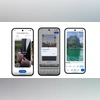 "Google Photos new video editing tools")
Google Photos new video editing tools
Listen to This Article
Google has introduced five new video-editing features in Google Photos to help users create short highlight videos from their photos and clips. According to the company, Google Photos already lets users combine multiple photos and video clips into a single highlight reel, but these updates are meant to make the process easier and quicker. The features sit alongside similar basic editing tools available in apps such as CapCut, InShot and Canva, which offer easy templates and quick editing options. Google said all the new features are either available now or rolling out.
Google Photos video-editing tools: What’s new
Templates
According to Google’s blog, the first change is templates. Google said that templates offer preset formats with built-in music, text and cuts that automatically sync to the soundtrack. Users can choose a template, select their photos and videos, and Google Photos will combine them into a shareable reel. The blog added that more templates will be introduced over time. This feature is rolling out on Android devices.
Redesigned video editor
The video editor has also been redesigned. Google said, “It features a universal timeline that supports multi-clip editing and storytelling, along with an adaptive canvas for easier editing.” The new layout places all tools where users expect them, so they spend less time searching for controls and more time editing. The adaptive canvas also helps when switching between clips. It is now available on both Android and iOS.
Soundtrack
Google noted that music can change the feel of a video, and users can browse the app’s music library to choose one that matches the tone of their highlight video. This feature is available on Android and iOS.
Also Read

 "Nothing Phone 3a community edition")
 "ai royalties india, dpiit ai framework, content creator royalties, statutory licensing ai, india ai regulation, llm training payments")
 "Microsoft logo, Microsoft")
 "Tech Wrap December 9")
 "POCO C85 5G")
Custom text
On Android, users can now add custom text overlays with different fonts, colours and background styles to give their videos more context or creative flair.
Individual clip editing
The redesigned editor is now the default editor for single-clip videos on Android. The company said users can open any video from their gallery, tap Edit, and use the same music and text tools on just one clip.
More From This Section
 "Gemini")
 "BGMI")
 "Google Maps on iOS (Image: Apple Community/cpur5)")
 "Dynamic Island on the iPhone 17 Pro")
 "iPhone 17 Pro, Pixel 10 Pro")
Topics : Tech News Google apps photos
Don't miss the most important news and views of the day. Get them on our Telegram channel
First Published: Dec 10 2025 | 12:26 PM IST