Home / Technology / Tech News / Google offers another Gemini paid feature for free on Android: Details here
Google offers another Gemini paid feature for free on Android: Details here
Initially, the on-screen awareness and camera sharing features of the Gemini Live were offered in free-tier model only to select Pixel and Samsung Galaxy smartphones
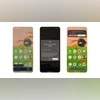
Share screen with Gemini Live on a Pixel 9 series smartphone (Screenshots)
Google has announced that it has started rolling out its Gemini Live’s camera and screen sharing features to all Android users with Gemini app. These features allow users to share their device’s screen or camera feed in real-time with the AI assistant, enabling more interactive and visually-aware conversations.
The feature rolled out earlier this month for all users with Google Pixel 9 series and Samsung Galaxy S25 series devices, while it was limited to Gemini Advanced subscribers on other Pixel smartphones. Now, it is available for all Android devices with Gemini app.
Camera and screen sharing with Gemini Live: Details
This feature turns Gemini into a real-time problem solver. With these new abilities, Gemini can understand what is on the screen of the smartphone or in the camera viewfinder, and offer relevant answers to questions in real time.
For example, you can point the smartphone camera at any object and ask Gemini to provide information related to it and the assistant will provide relevant answers in real time as the camera moves. Similarly, using the share screen option will address users' query or help depending on what is visible on the device’s screen such as websites, images, or documents.
How to share screen with Gemini Live
There are two ways to enable screen sharing:
Through the Gemini Mobile App:
Open the Gemini app and go to the Live interface.
Tap on the new “Turn on screen sharing” button at the bottom.
On the pop-up menu tap on “Share screen.”
Outside the Gemini App:
Activate Gemini by long-pressing the power button (available only on select devices) or using a voice command.
Tap on the “Share screen with Live” floating button that appears over the Gemini overlay.
On the pop-up menu tap on “Share screen.”
To stop sharing, return to the Gemini mobile app and tap “Turn off screen sharing.” Alternatively, swipe down from the top edge of the screen and tap “Stop sharing” on the Screen Sharing card. Screen sharing also stops automatically if Live is paused or the screen is locked.

 "Google offers another Gemini paid feature for free on Android: Details here")


 Connect with us on WhatsApp