Home / Technology / Tech News / Instagram adds Diwali cheer to stories, videos with AI filters: How to use
Instagram adds Diwali cheer to stories, videos with AI filters: How to use
Instagram launches Diwali-themed Restyle effects powered by Meta AI, letting users add fireworks, diyas, and rangoli visuals to Stories, videos, and videos processed through its Edits app
Instagram has rolled out Diwali-themed Restyle effects that allow users to add a festive layer to their photos and videos. Powered by Meta AI, the new effects are available on Instagram Stories for photos and videos and through the Edits app for videos. According to the company, these effects are designed to reflect Diwali’s traditional elements such as fireworks, diyas, and rangoli patterns. The update is part of Instagram’s broader effort to integrate AI-driven visual tools into its creative features.
Instagram Diwali-themed effects: What’s new
As per the company, the Restyle tool allows users to enhance their photos and videos by adding textures, colours, and moods that align with the festive season. To celebrate Diwali, Instagram has introduced three themed effects each for photos and videos, inspired by traditional motifs and colours associated with the festival of lights.
For photos, users can choose between Fireworks, Diyas, and Rangoli, while video creators can apply Lanterns, Marigold, or Rangoli effects. Each option is designed to capture the essence of Diwali – joy, brightness, and celebration.
The Diwali effects will be available till October 29 in India, as well as in the US, Canada, Singapore, and Australia.
How to use Restyle on Instagram Stories
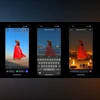
Open Stories by tapping “+” on your profile photo or swiping left.
Select an image or video from your camera roll.
Tap the Restyle icon (paintbrush) on the top bar.
Browse and select from the Diwali options: Fireworks, Rangoli, or Diyas for images, and Lanterns, Marigold, or Rangoli for videos.
How to use Restyle in Edits
Open Edits and tap “+” to start a new project.
Choose a video from Reels, Camera, or Gallery.
Tap the video in your timeline, then select Restyle.
Under the Diwali header, pick Lanterns, Marigold, or Rangoli, and export your video when done.
Additionally, users of Ray-Ban Meta smart glasses can say, “Hey Meta, Restyle this,” to instantly apply Diwali-themed lights, fireworks, and rangoli patterns to their photos using Meta AI. The reimagined images can be viewed directly in the Meta AI app.

 "Instagram adds Diwali cheer to stories, videos with AI filters: How to use")


 Connect with us on WhatsApp