Microsoft's Windows 11 update revamps BSOD with black, brings new tools
Windows 11's latest update swaps the blue crash screen for a new black version with clearer error info, arriving alongside system recovery improvements
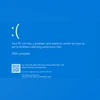
Aashish Kumar Shrivastava New Delhi Microsoft has begun rolling out a redesign of the infamous Blue Screen of Death (BSOD) in its latest Windows 11 update, replacing the familiar blue interface with a new Black Screen of Death. This visual overhaul brings a cleaner design that better matches the modern aesthetics of Windows 11.
In addition to the refreshed crash screen, the update introduces enhanced recovery tools, improved accessibility options, more intuitive navigation across system settings, and a set of new AI-powered features aimed at streamlining the overall user experience.
A redesigned BSOD: What’s changing?
For decades, the BSOD has appeared with its signature blue background, a sad face emoji, and technical stop codes when Windows encounters a fatal error. In the new update, Microsoft is streamlining this screen — removing the emoji and QR code — and introducing a simplified black layout. The stop code and technical details will still be there, but presented in a more readable way to help users and IT teams troubleshoot issues faster.
This redesign is part of Microsoft’s Windows Resiliency Initiative, aimed at reducing downtime and making error screens less cryptic. The black background now matches the visual style users already see during updates or system restarts, helping create a more unified and less jarring experience when crashes occur.
Other features arriving with the update
Alongside the updated BSOD, the new Windows 11 build introduces several enhancements across system usability, security, and AI integration:
- Quick Machine Recovery: In case of widespread boot failures, the system will now automatically enter recovery mode and attempt a fix through Windows Update, reducing the need for manual troubleshooting.
- Settings Redesign: On Copilot+ PCs, a new AI-powered settings agent can understand natural-language queries (like “make my pointer bigger”) and take appropriate actions.
- Click to Do Enhancements: New text-based actions like reading practice, immersive reading, and quick drafting with Microsoft Word are being introduced.
- File Explorer and Search Improvements: Minor interface fixes and performance enhancements have been made to address file navigation delays and improve search settings consolidation.
- Input and Gamepad Enhancements: A redesigned on-screen keyboard for game controllers now supports PIN login and easier navigation for gamers.
While the Recall feature (for exporting snapshots of your PC activity) is being introduced, it is currently only rolling out in the European region, so it will not be available to users in India or other non-EEA regions just yet.
Rollout and availability
The update, Windows 11 Build 26100.4762, is now rolling out via the Release Preview Channel for users running Windows 11 version 24H2. It will be available more broadly later this year as part of Microsoft’s official 24H2 release cycle, expected around late summer 2025. Features like the redesigned BSOD and Quick Machine Recovery will be enabled by default for most users.

 "Microsoft's Windows 11 update revamps BSOD with black, brings new tools")


 Connect with us on WhatsApp