Apple has rolled out the first public beta of iOS 26, giving iPhone users an early look at the company’s next major software update. The new release brings a refreshed “Liquid Glass” interface and introduces several
Apple Intelligence-powered features. While the stable version is still a few months away, iOS 26 is now available for public testing on the iPhone 11 series and newer models.
I have been running the beta on the iPhone 16e over the past few days, exploring what the new software has to offer. As expected with any beta release, there are occasional bugs and performance hiccups, but overall, iOS 26 public beta offers a solid preview of what iPhone users can expect later this year.
iOS 26: First encounter with Liquid Glass design
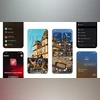
The new Liquid Glass interface in iOS 26 reveals itself right from the first reboot after installing the public beta. The lockscreen clock now carries a subtle, glass-like shimmer, while the left and right shortcut icons adopt a transparent, lens-like aesthetic – almost as if they are floating on contact lenses. This design language continues to the passcode screen, where the number pad also features the same translucent look.
Even the swipe-up gesture from the lockscreen gets a visual upgrade, with an animation that feels like you are peeling back a thin layer of glass from the screen. It is a small touch, but one that gives the interface a slick feel.
iOS 26: Homescreen and Lockscreen
As soon as you land on the homescreen, the changes are immediately visible. The dock holding your four primary apps now floats above a translucent layer, subtly setting it apart from the rest of the interface. App icons have also been updated to match the new Liquid Glass aesthetic – some changes are subtle, others more pronounced. Interestingly, this visual treatment extends to most third-party apps as well, though a few outliers like Airtel Xstream Play and the Formula 1 app have not adopted the new look yet. That said, broader compatibility is expected as the stable release approaches.
The Liquid Glass effect becomes even more noticeable when you swipe through grouped app icons, which now appear to sit atop a magnifying-glass-like surface that shifts dynamically with movement. If you prefer this aesthetic applied uniformly, iOS 26 offers a “Clear” app icon customisation option, which can be tinted in either light or dark themes. While this may slightly compromise visibility and make it harder to distinguish some apps at a glance, it lends the homescreen a clean, minimalist appeal.
The transparent styling continues in the Quick Settings panel and Notification Center, where each item now sits on its own distinct, glass-like strip—making individual notifications easier to visually separate.
On the lockscreen, the clock widget now resizes dynamically depending on the available space in your selected wallpaper. You can also manually stretch it by dragging, offering more control over the layout. However, while the Liquid Glass effect is used extensively across the lockscreen, it surprisingly does not extend to the widgets you manually place here – likely something Apple will refine before the final release.
iOS 26: Apple Intelligence and new features
The redesigned interface is not the only highlight of iOS 26; Apple is also bringing in a wave of smart features under its Apple Intelligence banner. Some of the most notable ones I have tried so far include:
- Hold Assist: This feature minimises the call interface when you are placed on hold and automatically alerts you when the caller returns. If you do not pick up right away, a live transcription shows what the caller is saying in real time. All these functions are already live in the public beta. However, there is one caveat: the system does not yet automatically detect when you are on hold. You have to manually activate Hold Assist from the call menu. Apple is likely to address this before the stable release.
- Live Translation: This feature offers real-time voice translation during calls, paired with an animated voice overlay and live transcription on-screen. It works well in supported languages, but at the moment, the language selection is quite limited. More options are expected to arrive with future updates.
- Call Recording: iOS 26 now lets you record phone calls, storing both the audio and a full transcription of the conversation in the Notes app. Like Live Translation, this feature currently supports only a handful of languages.
- Image Playground with ChatGPT styles: Apple’s Image Playground app lets you generate visuals in various artistic styles popularised by ChatGPT, including Oil Painting, Watercolour, Vector, Anime, Print, and a flexible “Any Style” mode. The process is similar to interacting with ChatGPT via Siri, with a prompt notifying users that their image request will be sent to ChatGPT for processing.
- Spatial Images: The Photos app now lets you convert any regular image into a spatial image even if the photo was originally taken with a different smartphone. However, you can not take many actions from within the app when viewing spatial images. For instance, if you want to use a spatial image as your wallpaper, you will need to do so from the lockscreen customisation interface.
iOS 26: Changes to apps
iOS 26 also brings a host of subtle UI refinements across core apps, aimed at simplifying navigation and decluttering the experience.
One of the most noticeable changes is the redesigned Camera app. The bottom slider has been streamlined to just two primary modes – Photo and Video. You can tap either to switch instantly, or swipe sideways to access additional modes like Portrait, Slo-Mo, and Timelapse. The result is a cleaner, more intuitive layout that keeps the focus on shooting.
In the Photos app, the bottom tab now offers just two sections: Library and Collections, along with a floating search icon for quick access. As you scroll through your gallery, the UI adapts—the bottom bar transforms to show sorting options like date-based filters.
One of my personal favourite tweaks is in Safari, where the new translucent bottom bar minimises as you scroll through webpages. This provides a cleaner look while maximising the reading space. Tap the collapsed bar, and it expands to reveal full navigation and sharing tools. It’s a small touch, but a welcome one.
While the translucent UI is now standard across most of Apple’s system apps, the auto-minimising bottom bar remains exclusive to Safari for now. I hope Apple extends this design to more apps like Mail in the future.
iOS 26 also introduces two new apps. The Preview app finally debuts on iPhones, allowing users to make edits to screenshots, annotate files, and save them directly as PDFs – bringing Mac-like functionality to mobile. Then there is the new Games app, which feels like a more modern and refined take on Game Center. It not only displays your achievements and in-game events but also lets you browse and download titles from the App Store and play along with friends – all within a unified hub.

 "iOS 26 public beta hands-on: Liquid Glass, simplified UI, and new AI tools")


 Connect with us on WhatsApp