The
Kingston Dual Portable SSD looks like a chunky pen drive at first glance, but it behaves more like a proper external solid-state-drive. It has a USB-C connector on one end, a USB-A on the other, and no cables anywhere in sight. You just plug it straight into your phone, tablet, laptop, or PC and start using it.
I used it the way most people actually would: dumping photos and videos when storage runs out, editing straight off it, moving files between devices, and occasionally pushing it harder than it probably wants to be pushed. This review is based on that kind of everyday use, not lab tests, not speed charts, just how it feels to live with.
Kingston Dual Portable SSD: Capacity and pricing
- 512GB: Rs 22,000
- 1TB: Rs 32,000
- 2TB: Rs 54,000
Kingston Dual Portable SSD: Specifications
- Interface: USB Type-A and USB Type-C
- Standard: USB 3.2 Gen 2
- Read speed: Up to 1,050MB/s
- Write speed: Up to 950MB/s
- Storage options: 512GB, 1TB, 2TB
- NAND type: 3D NAND
- Dimensions: 71.85mm × 21.1mm × 8.6mm
- Weight: 13g
- Operating temperature: 0 degree Celsius to 60 degree Celsius
- Storage temperature: -20 degree Celsius to 85 degree Celsius
- Compatibility: Windows 11, macOS (v13.7.6+), Linux (v4.4+), Chrome OS, Android, iOS/iPadOS (v13+)
What I liked
The no-cable life is genuinely freeing
The best thing about this SSD is also the simplest: there is no cable. You don’t need to remember anything extra. You don’t need to find the right wire. You don’t need a table to balance your phone and drive on. You just plug it in and it works.
I used it a lot with my phone and tablet, especially when storage started screaming at me at the worst possible time. Plug it in, move files, unplug, done. It feels more like using a fast pen drive than a traditional “external SSD”, and that’s a good thing.
Small enough to forget, solid enough to trust
It’s tiny. You can drop it in your jeans pocket, backpack, or camera bag and forget it’s there. Despite the size, it doesn’t feel flimsy. The metal body feels solid, like it can survive being tossed around daily without drama.
That matters because this is clearly meant to be carried, not left on a desk.
Great for everyday creative work
I edited photos and videos directly off the SSD using Lightroom and Premiere on the iPhone 17. Importing, editing, exporting — it all worked smoothly. There were no random freezes, no “this drive is too slow” moments, and no need to copy everything back to internal storage first.
Additionally, connecting the Kingston Dual Portable SSD to an iPhone 17 Pro Max immediately enabled direct 4K 60fps recording in ProRes LOG and HDR formats. It worked seamlessly, unlike the SanDisk Creator Phone SSD, which required a companion app just to enable external recording and even access the files – as noted in the review here.
On this drive, the phone simply recognised the Kingston drive and let me start recording without any extra steps. The Dual Portable SSD did get warm during the process, but that was expected given its compact footprint.
Useful in “storage full” emergencies
This drive is perfect for that moment when your phone says “Storage almost full” right when you’re trying to shoot something important. Plug it in, move a bunch of stuff, and suddenly your phone can breathe again.
You can even record directly onto it using certain apps and phones, which sounds great in theory, but in practice comes with some limits (more on that below).
Where it fell short
It doesn’t like heavy, sustained workloads
I tried recording 4K 60fps video at very high bitrates directly onto the SSD using apps like Blackmagic Camera on the Google Pixel 10 Pro Fold. Within seconds, the Kingston Dual Portable SSD started getting noticeably hot. Not warm, but hot enough that you become aware of it.
Soon after, I started getting frame-drop warnings. To be fair, even recording high-bitrate video to internal storage on some phones isn’t perfectly smooth. But frame drops happened faster when recording directly to the SSD.
I tried the same on the iPhone 17 that handles heavy recording a bit better, and while it lasted slightly longer, the story was similar. This made it clear: this SSD is not built for constant, extreme write loads like high-bitrate video recording.
It can do it briefly, but it’s not what it’s happiest doing.
Gaming from it is possible, but not ideal
I installed the F1 2024 PC game directly onto the SSD just to see what would happen. The game did launch, but it took a very long time to start. Once inside, gameplay itself was mostly smooth, but the long loading times made it obvious that this isn’t what the drive is designed for.
It works, but it doesn’t feel right. This is not a “run your entire gaming library from it” kind of device.
The end caps are easy to lose
Both connectors are protected by small plastic caps. They do their job, but they’re not attached to the body in any way. That means they’re very easy to drop, forget, or lose.
Once they’re gone, the drive still works fine, but the connectors are now always exposed, which isn’t ideal for something meant to live in pockets and bags.
Phone cases can get in the way
If your phone has a thick or rugged case, the SSD might not plug in properly. The connector doesn’t stick out very far, so bulky cases can block it. It’s not a deal-breaker, but it’s something you notice quickly.
Who should buy the Kingston Dual Portable SSD
- You move files between phones, tablets, and computers often
- You hate carrying cables
- You want something you can throw in your pocket and forget about
- You edit photos or videos casually and want to work directly off external storage
- You just want fast, simple, portable storage without fuss
You probably shouldn’t buy this if:
- You plan to record long, high-bitrate videos directly onto it all the time
- You want to run heavy games or software from external storage
- You need something for constant, intense workloads
Final thoughts
The Kingston Dual Portable SSD is not trying to be everything. It’s not trying to replace big desktop drives or ultra-fast professional storage. What it wants to be is simple: fast storage that you can carry anywhere and plug into almost anything without thinking.
For everyday use — moving files, freeing phone storage, editing media, carrying backups — it does that job really well. It only starts to complain when you push it into roles it clearly wasn’t designed for.
If your life involves phones, laptops, photos, videos, and the constant fear of “storage full”, this drive quietly makes that life easier.

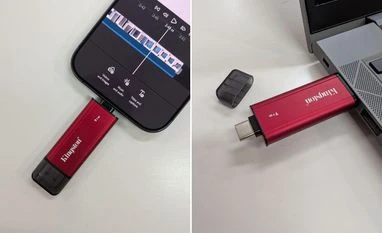 "This Kingston SSD is ultra-portable, cable-free, and iPhone LOG compatible")


 Connect with us on WhatsApp