Home / Technology / Tech News / Microsoft Copilot Vision now reads entire screen, offer real-time guidance
Microsoft Copilot Vision now reads entire screen, offer real-time guidance
Copilot Vision can now scan your entire desktop, delivering real-time insights, contextual tips, and interactive guidance across apps, creative workflows, games, and more
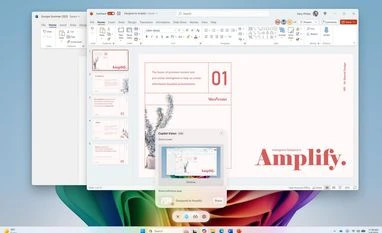
Desktop Share with Copilot Vision (Image: Microsoft)
Microsoft is rolling out a major update to its Copilot Vision feature on Windows, expanding its real-time screening capabilities beyond just two apps at a time. With the new update, Copilot Vision can now scan your entire desktop or any specific browser or application window, offering real-time assistance, insights, and task guidance based on what's visible on your screen.
Copilot Vision: Desktop Share
According to Microsoft’s official Windows blog, the feature now functions much like a live screen-sharing session in a video call. By clicking the glasses icon in the Copilot app, users can choose which part of their screen — be it the full desktop or an individual app window — to share with Copilot. Once enabled, the AI can see what’s happening on-screen and offer relevant responses.
Unlike Microsoft's Recall feature, which passively records screen activity in the background, Copilot Vision only activates when users explicitly choose to share their screen. This makes the feature more privacy-conscious and user-controlled.
The update aims to make Copilot more helpful across a range of activities — whether you’re editing a creative project, updating a resume, or trying to master a new game. With the shared screen view, Copilot can analyse the visible content and provide personalised suggestions, spoken tips, or step-by-step guidance.
Microsoft explains: “Get tips on making improvements to your creative project, help with improving your resume, or guidance while navigating a new game.”
Copilot Vision also integrates with voice input. If you're speaking with Copilot and want to add visual context, simply click the glasses icon to initiate screen sharing. This adds another layer of interactivity, building on earlier features where Copilot could analyse browser activity or input from a phone camera.
The new capabilities are available with Copilot app version 1.25071.125 and higher, being rolled out via the Microsoft Store. However, availability is currently limited to Windows Insiders who already have Windows Vision enabled. Microsoft notes that the rollout will be gradual and not all Insiders will receive the update right away, as the company continues to test and refine the experience.

 "Microsoft Copilot Vision now reads entire screen, offer real-time guidance")


 Connect with us on WhatsApp