I used the
Motorola Edge 70 Fusion as my secondary phone for a few weeks, mainly for browsing, streaming videos, replying to work messages, and testing the camera during short walks or outings. Using it alongside my primary device helped me notice things that might not stand out during a quick hands-on session or if I have used it as a primary device. Over time, the Edge 70 Fusion felt like a phone that quietly focuses on the basics like a good display, clean software and dependable battery life rather than trying to stand out with flashy features.
Design: Familiar Motorola Edge design language
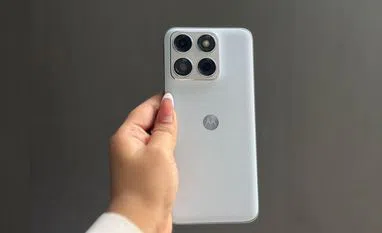
Motorola has been following a consistent design language with its recent Edge devices, and this phone continues that approach. It also looks quite similar to the Motorola Edge 70, which I reviewed back in December. The overall design language hasn’t changed much — the camera placement and module layout on the back panel follow the same style, giving the phone a familiar look if you’ve seen the earlier model. The main noticeable difference is the thickness, as the Edge 70 was one of the company’s slimmer phones. Otherwise, the design largely sticks to the same Motorola approach seen in the previous device.
The camera module flows into the back panel rather than sitting inside a large rectangular bump, giving the phone a cleaner look. Instead of a glossy glass back, the phone uses a textured matte finish that feels similar to fabric or vegan leather. In everyday use, this turned out to be quite practical. The back panel doesn’t attract fingerprints easily and offers a decent grip while holding the phone. However, I did notice that the textured finish tends to catch dust quite easily. It usually settles on the surface rather than sticking to it, so wiping it clean is fairly simple.
Display: Smooth pOLED screen
The 6.78-inch pOLED display on the Edge 70 Fusion is something I ended up noticing quite often during everyday use. Since I mostly used the phone for social media and entertainment, the screen naturally got a lot of use throughout the day. Whether I was scrolling through Instagram, watching YouTube videos during breaks, or catching up on a show before sleeping, the display was constantly in use. Over time, it became one of the parts of the phone that stood out simply because of how often I interacted with it.
Motorola lets you switch between different refresh-rate modes: Smart (balanced), Hyper Smooth and Efficiency First. The difference between them is actually noticeable in daily use. When the phone is set to Hyper Smooth, scrolling through apps like Instagram, X, or even long web pages feels extremely smooth. Reels and short videos also appear smoother when you’re quickly swiping through them.
I mostly kept the phone on Hyper Smooth mode, even though it uses slightly more battery. The reason is simple: once you get used to the smoother animations, switching back to the other modes feels a bit less responsive. For example, when I was scrolling through Instagram Reels late at night or quickly switching between apps while messaging friends, the phone felt consistently smooth.
Performance: Reliable for everyday tasks
The Edge 70 Fusion runs on Qualcomm Snapdragon 7s Gen 4 processor. During my time with the device, I mainly used it for apps like Chrome, Instagram and the camera. The phone handled these tasks comfortably. App launches were quick, and switching between multiple apps didn’t cause noticeable slowdowns.
I also tried a few games just to see how the phone handled them. The phone warmed up slightly during longer gaming sessions, but nothing unusual for a device in this category.
Software: Clean Android experience
For me, one of the biggest concerns with Android phones has always been the cluttered interface that many brands tend to add. It’s quite common to see multiple preinstalled apps, duplicate services and extra features that you may never really use. Over time, that can make the phone feel crowded and, at times, slightly overwhelming to navigate.
That’s why I usually appreciate Motorola’s approach to software. The Edge 70 Fusion sticks to a fairly clean Android experience, which makes a noticeable difference in everyday use. The interface doesn’t feel overloaded with unnecessary apps or visual tweaks. Most of the core Google apps are already there and, apart from a few Motorola additions, there isn’t much else preinstalled. In practical terms, this makes the phone feel lighter and easier to navigate. Opening the app drawer doesn’t feel messy, and finding settings is fairly straightforward.
Motorola’s gesture shortcuts are also still present, and they remain genuinely useful. The twist gesture to launch the camera quickly became something I used several times a day. Similarly, the chop gesture for the flashlight is a simple but convenient way to access the torch without unlocking the phone.
Moto AI assistant features
Motorola is also pushing its own Moto AI features on the phone, and I did spend some time trying them out during the review period. I mostly used it for simple things like summarising notifications, transcribing notes or quickly pulling up information from what was on my screen. In practice, these features work fine and can save a bit of time, especially when you don’t want to manually go through long notifications or notes.
Moto AI also includes a feature called “Remember This,” which I found quite practical. It lets you quickly save things like screenshots, notes or on-screen information, and later you can simply ask the phone to recall it instead of searching through your gallery or files.
What I liked is that Motorola doesn’t lock you into just one AI system. Moto AI works alongside tools like Perplexity, Copilot and Gemini, so you can jump between them depending on what you want to do.
Motorola has also added support for AI tools like Perplexity and Microsoft Copilot. Perplexity mostly felt like any other AI-powered search tool. Instead of opening a browser and going through multiple links, I could just type a question and get a quick, summarised answer. I found myself using it a few times when I needed quick information or context while reading something online. Copilot is a bit more focused on productivity. I occasionally used it to summarise longer text or draft short replies, and it worked well for simple tasks.
Cameras: Generic
The Motorola Edge 70 Fusion uses a 50MP Sony LYTIA 710 main camera, paired with a 13MP ultra-wide lens, while the front houses a 32MP selfie camera. In daily use, the camera setup felt dependable rather than particularly dramatic.
Most of the photos I took were during normal situations — quick shots while stepping out, random street scenes, food pictures, or photos of friends. In good lighting, the main camera manages to capture plenty of detail. For example, when I clicked photos of cafes or buildings during the day, textures like tiles and small design details were clearly visible. The colour tuning also feels fairly balanced. It doesn’t overly boost colours, which sometimes makes images look more natural when sharing them on social media.
However, the selfie camera didn’t leave the best impression during my use. Despite having a 32MP front camera, which on paper should deliver fairly detailed selfies, the results were not consistent. In slightly lower lighting conditions, the front camera struggles to capture even a decent photo.
Battery: Large capacity and fast charging combo
The Motorola Edge 70 Fusion packs a 7,000mAh battery with support for 68W TurboPower fast charging. Since I used the phone mostly as a secondary device, I didn’t end up pushing it enough to give a very precise estimate of battery life.
That said, from the way I used it — mostly for scrolling through social media, watching videos and replying to messages — the battery seemed quite reliable. I didn’t find myself needing to charge it frequently, and it generally lasted comfortably through the day.
Because I wasn’t using the phone as heavily as my primary device, it’s difficult to explain the exact screen-on time, but from my experience so far, the large battery should be able to handle typical daily usage without much trouble.
Things to consider before buying
- Familiar design: If you’ve seen recent Motorola Edge phones, the Edge 70 Fusion may not feel very new. The camera layout and overall back design are quite similar to previous models.
- Selfie camera limitations: Despite having a 32MP front camera, results can be inconsistent, especially in slightly lower lighting. It might not always produce the kind of selfies you’d want for social media.
- Curved display edges: The curved screen looks nice, but during one-handed use I occasionally noticed accidental touches near the edges.
- Dust on the back panel: If you’re using the phone in a lighter colour, dust on the back panel can be quite noticeable, so it often needs a quick wipe. The textured finish helps with grip and avoids fingerprints, though.
Verdict
The Motorola Edge 70 Fusion feels like a phone that doesn’t try too hard to stand out — and in some ways, that works in its favour for users who want to keep things minimal. During the few weeks I used it as my secondary device, it handled the things I actually use a phone for pretty comfortably: scrolling through social media, watching videos and more. The display is easily one of its highlights, especially if you spend a lot of time watching reels, YouTube videos or simply scrolling. Motorola’s clean Android interface also makes the phone feel less cluttered compared with many other Android phones.
That said, it doesn’t feel dramatically different from Motorola’s earlier Edge phones. The design looks familiar, and while the cameras are reliable for everyday shots, the selfie camera could have been better. But if you prefer a clean Android experience, a good display for content and a phone that simply works without too much complication, the Edge 70 Fusion ends up being a practical option.
Pricing
- 8GB RAM + 128GB storage: Rs 26,999
- 8GB RAM + 256GB storage: Rs 29,999
- 12GB RAM + 256GB storage: Rs 32,999
Motorola Edge 70 Fusion: Unboxing

 "Motorola Edge 70 Fusion review: Built for scrolling, streaming, daily use")


 Connect with us on WhatsApp