


ChatGPT rolls out AI image generation for free users: Here's how it works
Now, you can create stunning AI-generated images, such as those in the Studio Ghibli style, using the free version of ChatGPT. Here's how
 "OpenAI, ChatGPT, Image Generation")
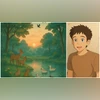
OpenAI has integrated advanced image-generation capabilities into ChatGPT through its GPT-4o model. (Photo: OpenAI)
Listen to This Article
OpenAI has announced a major update to its AI-powered image-generation tool, making it available to all free-tier ChatGPT users. This means that anyone using ChatGPT can now create stunning AI-generated images with just a simple text prompt without any cost.
Previously, this feature was restricted to paid users.
"ChatGPT image generation now rolled out to all free users," said OpenAI CEO Sam Altman on Tuesday in a post on X.
chatgpt image gen now rolled out to all free users!
— Sam Altman (@sama) April 1, 2025
Encouraging users to continue to use OpenAI's ChatGPT, Altman said, "We will not do anything silly like saying that you can't use our open model if your service has more than 700 million monthly active users. We want everyone to use it!"
Also Read

 "OpenAI's GPT-4o")
 "OpenAI, ChatGPT, AI")
 "Alibaba, Qwen, Qwen3, AI")
 "OpenAI shopping feature, ChatGPT product search, ChatGPT shopping, WhatsApp integration, Online shopping, e-commerce companies")
 "artificial intelligence")
How to use ChatGPT’s image-generation tool
OpenAI has integrated advanced image-generation capabilities into ChatGPT through its GPT-4o model, allowing users to create detailed and realistic images directly within the chat interface.
To use the image generation tool, one needs to follow these steps:
- Access ChatGPT on the preferred device and log in to the account.
- Initiate a new conversation by selecting the option within the interface.
- In the message input area, type a prompt describing the image that needs to be generated and submit it. For example, one might enter "create an image of a forest landscape at dawn with animals and birds near a pond in Studio Ghibli style." The more detailed the description, the better the generated image will align with the user's vision.
Users can specify attributes such as aspect ratio, colour schemes using hex codes or opt for transparent backgrounds with ease.
- Once the image is ready, it can be downloaded.
- If the generated image does not meet the expectations, one can provide additional details or request modifications to refine the output.
Users who want to edit existing images can upload images for modification by clicking the "+" sign in the chat prompt area, adding an image from the device and providing instructions for the desired edits. For example, one can say, "Convert this image into a Studio Ghibli-style picture."
The versatile image-generation tool enables users to explore their creativity across a wide range of artistic styles, including South Park, Minecraft, Lego, voxel, watercolour, marionette, and rubber hose animation. The tool can be used for creative design purposes, supporting the production of infographics, product mockups, logos, posters, and other visual advertising materials.
Alternative ways to create AI-generated images
Apart from ChatGPT, there are several other ways to create AI-generated images, like OpenAI's standalone image generator DALL.E, the open-source AI image tool Stable Diffusion, the free online image generator Deep Dream Generator, and RunwayML.
There are also mobile applications that offer easy-to-use AI-powered image creation directly on smartphones. For example, Dream by Wombo, Lensa AI, Picsart AI, among others. There are some graphic design softwares also with AI integration like Canva, Adobe Firefly, Fotor.
Some AI models, such as DeepAI, Stable Diffusion can help the tech-savvy users create images via programming interfaces and Python (programming language) scripts.
More From This Section
 "Tech Wrap March 31")
 "Apple")
 "Perplexity")
 "Apple's Health app on iOS 18")
 "Clash of Clans X WWE")
Don't miss the most important news and views of the day. Get them on our Telegram channel
First Published: Apr 01 2025 | 9:58 AM IST