


Spotify tests DJ-like playlist mixing with custom transitions: How it works
Spotify is testing a playlist mixing feature for Premium users with seamless transitions, presets, EQ, and manual controls for a smoother listening experience
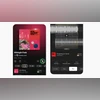 "Spotify's Mix feature")
Spotify's Mix feature
Listen to This Article
Spotify has rolled out a playlist mixing feature in beta for premium users, giving them more control over how songs transition within playlists. Designed to enhance playback flow, the tool eliminates abrupt pauses between tracks by offering automatic and manual mixing options.
The feature is being introduced gradually to premium subscribers, with Spotify recommending users update the app to access the latest version.
Spotify Mix: Auto and manual modes
The Mix tool provides two ways to manage transitions:
- Auto Mode: Spotify automatically applies seamless transitions for smooth playback.
- Manual Mode: Advanced users can adjust volume, EQ, and effect curves, with waveform and beat data displayed to identify exact transition points.
Each song can be assigned its own transition style. The app also displays BPM (beats per minute) and key information, making it easier to blend tracks effectively.
How to use Spotify Mix
- Open or create a playlist
- Select “Mix” from the toolbar
- Choose Auto for instant transitions or customise manually
- Apply presets such as Fade or Rise
- Fine-tune EQ, effects, and transition points
- Save and share the playlist with friends on Premium
- Toggle Mix on or off anytime using the Mix button
Tips for smooth transitions
Spotify suggests:
- Match tempos and keys for natural blends
- Use transition-friendly genres such as house or techno
- Plan energy flow by arranging songs to rise or fall gradually
- Curate playlists by mood — running, party, or road trip mixes benefit most
- Personalise visuals with cover art, stickers, and labels for mixed playlists
More From This Section

 "Representative image: M4 Mac mini and MacBook Air")
 "Meta AI Translations for Creators on Facebook")
 "Google Pixel 10 Pro Fold and Pixel 10 Pro")
 "BGMI")
 "Realme P4 Pro 5G")
Topics : Audio companions
Don't miss the most important news and views of the day. Get them on our Telegram channel
First Published: Aug 20 2025 | 12:55 PM IST