Meta has started rolling out its AI Images feature for Instagram in India, allowing users to post Meta AI-generated images on Stories from within the app. Available on the Instagram Stories interface, the new "AI Images" option offers a collection of AI-generated images that the users can post. Alternatively, users can prompt Meta AI with a description of an image that they want to share.
The feature has started showing up for select users, with the latest Instagram mobile app version for both Android and iOS platforms.
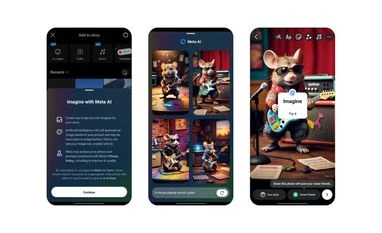
Meta AI-generated images on Instagram Stories: How to share
Tap on the "+" icon visible on your Instagram profile picture to open the Image picker interface.
Select the new "AI Images" option available on the sliding menu at the top of the interface.
Tap on "Continue" to agree to Meta's AI Terms.
A new Meta AI interface will appear, displaying a collection of AI-generated images.
Tap on one to share that image to your Story.
Alternatively, you can tap on the text field near the bottom of the screen to enter a prompt manually.
When prompted, Meta AI will generate up to four images based on your description. You can select one or tap on regenerate to get new results.
Once an image is selected, the Story sharing interface opens up where you can add text, stickers, music and more before posting it.

 "Instagram shows AI generated image option in Stories in India: How it works")


 Connect with us on WhatsApp