Home / Technology / Tech News / Microsoft continues to add more features to Notepad on Windows: What's new
Microsoft continues to add more features to Notepad on Windows: What's new
Soon, Notepad users will be able to apply formatting such as bold and italic text, insert hyperlinks, and work directly with Markdown syntax within the application
Microsoft’s Notepad on Windows, long recognised for its simplicity and utility as a tool for removing text formatting, is now receiving a significant update that introduces new formatting capabilities. The update is currently being rolled out to testers in the Canary and Dev Channels of Windows 11. For the first time, Notepad users will be able to apply formatting such as bold and italic text, insert hyperlinks, and work directly with Markdown syntax within the application.
Microsoft Notepad: What’s new
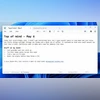
As part of the update, a new formatting toolbar has been introduced at the top of the Notepad window, alongside the familiar File, Edit, and View options. This toolbar provides access to basic formatting tools including bold, italic, and hyperlink insertion. It also includes options for creating lists and adding headings, offering users greater control over the structure of their content.
In an official blog post, Microsoft explained the Markdown functionality, stating: “The experience supports Markdown-style input and files for users who prefer to work directly with the lightweight markup language. You can switch between formatted Markdown and Markdown syntax views in the view menu or by selecting the toggle button in the status bar at the bottom of the window.”
This represents a notable shift for Notepad, which has traditionally served as a default application for plain text editing and stripping out rich text formatting. With the addition of formatting tools, some users may question whether Notepad will retain its effectiveness in this original role.
Notepad remains commonly used for writing and editing plain text, and removing formatting remains straightforward. Users can clear all formatting either via the new toolbar at the top or by selecting the relevant option from the Edit menu within the application.
For those who prefer the traditional plain-text experience and do not find the lightweight formatting features useful, there is the option to disable them entirely. This can be done through the Notepad app’s settings by turning off the formatting support feature.
This latest update follows less than two weeks after Microsoft introduced an AI-powered capability designed to generate text based on user prompts. The newly launched “Write” tool allows users to produce content quickly from basic inputs. With the introduction of formatting features, Notepad is beginning to resemble a streamlined version of Microsoft WordPad, which was discontinued in 2023.

 "Microsoft continues to add more features to Notepad on Windows: What's new")


 Connect with us on WhatsApp