


Apple Intelligence debuts in India on iPhones, Macs: All you need to know
With the release of iOS 18.4, iPadOS 18.4, and macOS Sequoia 15.4, Apple Intelligence supports localised English (India) language
 "Apple Intelligence in India")
Apple Intelligence in India
Listen to This Article
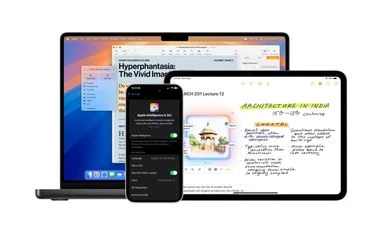
Apple has officially launched iOS 18.4, iPadOS 18.4, and macOS Sequoia 15.4, expanding Apple Intelligence support to more regions, including India. This update introduces localised English (India) language support, along with other languages such as French, German, Italian, Portuguese (Brazil), Spanish, Japanese, and more.
With this roll out, Apple users in additional regions can now access advanced AI-powered tools, including Writing Tools, Image Playground, Image Wand, and more. Apple said that these features will adapt to the user's language, ensuring a more personalised and intuitive experience.
Here are all the Apple Intelligence features that are now available in India on eligible iPhones, iPads and Macs:
Also Read

 "Apple Intelligence in India with iOS 18.4 update")
 "iOS 18.4 update")
 "Apple")
 "Apple's Health app on iOS 18")
 "MacBook Pro and iPad Pro (2024)")
Apple Intelligence features available in India
- Writing Tools: Integrated into iOS, iPadOS, and macOS, Writing Tools help users rewrite, proofread, and summarise text across apps like Mail, Messages, Notes, and more. Users can adjust tone, check grammar, and summarise text into paragraphs, key points, or lists.
- Clean Up in Photos: A new Clean Up tool allows users to remove unwanted objects or people from photos while maintaining the authenticity of the image.
- Smart Search in Photos: Users can search for specific moments in photos and videos using natural language descriptions, such as “Maya dancing in a red dress.”
- Memories in Photos: Apple Intelligence helps users create memory movies by selecting and arranging photos and videos based on a text description, adding a storyline with thematic chapters.
- Image Playground: An image creation tool which is available as a standalone app and is also integrated into native apps like Messages, Freeform, and Keynote. Users can generate images based on themes, costumes, and settings, using styles like Animation, Illustration, and Sketch.
- Genmoji: A new feature that allows users to generate unique emoji by typing a description. Users can even create personalised Genmoji inspired by photos of friends and family.
- Image Wand in Notes: A tool in the Notes app that transforms rough sketches into polished images or generates images based on surrounding text. It uses Apple Intelligence to enhance note-taking.
- Priority Messages in Mail: A new section in Mail highlights important emails at the top of the inbox (e.g., boarding passes, urgent invites). Users can also view email summaries without opening messages.
- Priority Notifications: Helps users focus on important alerts by summarising long notifications and prioritising time-sensitive messages, such as urgent meeting invites.
- Audio transcription and summarisation: The Notes and Phone apps can now record, transcribe, and summarise audio and phone calls automatically, making it easier to recall key points from conversations.
- Smarter Siri: Siri now has a more natural, conversational interface, supports voice and text switching, and can answer questions about Apple device settings and features.
- Visual Intelligence: This feature helps users identify objects, translate text, and create calendar events from posters or flyers. It also enables visual search using Google Search or ChatGPT.
- ChatGPT integration: Siri and Writing Tools can now access ChatGPT for advanced responses and image generation. Users can enable this feature while maintaining full control over data sharing.
Apple Intelligence: Eligibility
Apple Intelligence is available for the following devices:
- iPhone 15 Pro
- iPhone 15 Pro Max
- iPhone 16 series
- iPhone 16e
- iPad Air (M1 and later, starting with the 2022 model)
- iPad Pro (M1 and later, starting with the 2021 model)
- MacBook Air (M1 and later)
- MacBook Pro (M1 and later)
- iMac (M1 and later)
- Mac mini (M1 and later)
- Mac Studio (M1 Max and later)
- Mac Pro (M2 Ultra)
More From This Section
 "OpenAI, ChatGPT, Image Generation")
 "Garena Free Fire Max")
 "Tech Wrap March 31")
 "Apple")
 "Perplexity")
Topics : Apple iPhone artifical intelligence Apple iOS
Don't miss the most important news and views of the day. Get them on our Telegram channel
First Published: Apr 01 2025 | 10:36 AM IST