


This Samsung-first Google's Circle to Search feature expands to more phones
With Android 16 QPR2 update, Google brings Circle to Search's continuous scroll-and-translate feature to more phones, ending Samsung's exclusivity. Here's how you can use it
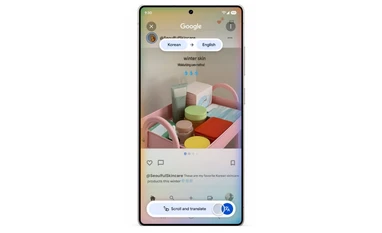 "Google's \"Scroll and Translate\" feature (Image: Google)")
Google's
Listen to This Article
Google has reportedly expanded Circle to Search’s continuous translation feature to more Android devices with the rollout of Android 16 QPR2, ending its earlier exclusivity on Samsung phones. According to a report by 9To5Google, the new “Scroll and translate” upgrade allows users to move through a page while translations update automatically, eliminating the need to repeatedly close and relaunch the tool. Previously, Circle to Search could only translate what was visible on the screen at that moment.
Google first announced “Scroll and translate” in September, 2025 with limited availability on Samsung devices. As per the report, the company has now rolled it out widely through its Android 16 update, though with the caveats: availability varies by device, it requires an internet connection, and performance depends on app compatibility and visual accuracy.
The feature can be used for apps with endless feeds, where users often scroll through menus, articles, social posts, and comment threads. When active, Circle to Search initiates a live screen-sharing session, signalled by a status bar indicator, and displays a glowing overlay to show that continuous translation is running. A bottom pill-shaped control lets users stop the session or minimise the indicator.
Business Standard attempted to verify whether this feature is available on the Pixel 10 Pro in India. At present, the feature is not live, hence it is possible that it may arrive in the next few days.
Also Read

 "Updated Gemini on web")
 "Samsung Exynos 2600")
 "Samsung Galaxy Tab A11")
 "Android 16 update")
 "Amar Subramanya")
How to use scroll and translate feature on Circle to Search
- Long-press press home button to trigger Google Assistant, akin to how we do to trigger the circle to search feature
- Click on the translate icon on the search bar at the bottom of the screen
- Click on scroll and translate, and start scrolling or swiping to translate the texts on screen
Other updates in Android 16 QPR2
Additionally, Google is extending several Android 16 features beyond Pixel phones, including AI-powered notification summaries, an automatic organiser for low-priority alerts, expanded home-screen customisation, and a more aggressive dark mode that can override unsupported apps. The update also unifies parental controls under a single settings hub and adds Fast Pair support for Bluetooth LE hearing aids, launching first with Demant devices.
The release brings a wider set of usability and safety upgrades as well. Expressive Captions now offer tone and ambient-sound markers for clearer context in silent video viewing. Google is also testing an “urgent” call flag in the Phone app, improving group-chat controls in Messages, and integrating Circle to Search into scam detection. Additional enhancements include new Chrome tab-pinning options and expanded Gboard Emoji Kitchen combinations.
More From This Section
 "Apple iOS 26")
 "OnePlus Ace 6T unveiled in China")
 "Hypertension notifications feature Photo: Apple")
 "Alan Dye, attending a GQ even last month, is leaving Apple for Meta")
 "Artificial Intelligence, AI Technology, IT Sector")
Topics : Google Samsung Android Technology
Don't miss the most important news and views of the day. Get them on our Telegram channel
First Published: Dec 04 2025 | 12:22 PM IST