


Instagram: How to create an AI doppelganger with Meta's Imagine Me feature
Meta's Imagine Me on Instagram lets you turn profile photos into AI-made doubles, placing them in any setting or style with just a short prompt and quick approvals. Here's how you can do it
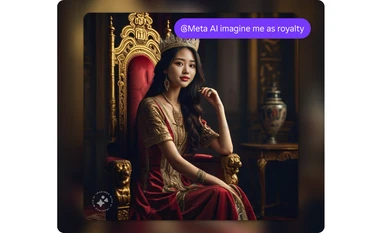 "Meta AI's 'Imagine Me' feature")
Meta AI's 'Imagine Me' feature
Listen to This Article
Meta’s “Imagine Me” feature has been available for some time, letting users create their AI-generated doppelgangers of themselves in different settings, outfits, or artistic styles. Integrated into the Meta AI chatbot, it works by using a few approved profile photos to produce personalised images from a simple text prompt. People have experimented with this feature and shared results on social media platforms.
Using Imagine Me is straightforward: You provide Meta AI with a handful of pre-selected photos, approve them for processing, and then type a short description of what you want to see. The AI model generates images on demand without permanently storing facial data, according to Meta. Since Instagram is the platform for creativity, here’s a step-by-step guide to using Meta’s Imagine Me feature on Instagram.
How to use Imagine Me feature on Instagram
- Open the Instagram app on your smartphone.
- Swipe right to go to the inbox page.
- Search for Meta AI in the Search bar and open it.
- Type “Imagine me as …” (Type whichever setting you want your AI doppelganger to be in) and press Send.
- Meta AI would ask you to submit a few pictures of yourself to help it create an AI avatar of you. Do the needful and wait for Meta AI to do its magic.
- Your AI doppelganger would be ready within seconds.
Note: Some responses generated by AIs might not be accurate or appropriate. You can provide feedback to Meta about responses from Meta AI. Here’s how you can do it:
- Tap and hold the AI image you'd like to provide feedback on.
- Tap Good response or Bad response.
- If prompted, add a reason, then tap Submit.
More From This Section

 "Representative image: Samsung Display's Flex G prototype and iPhone 16 Pro Max")
 "WhatsApp")
 "Gadget launched this week")
 "Google Pixel 10 Pro Fold and Pixel 10 Pro")
 "WhatsApp")
Topics : Artificial intelligence Instagram AI Models
Don't miss the most important news and views of the day. Get them on our Telegram channel
First Published: Aug 15 2025 | 3:10 PM IST