


Turn your selfies into Android bots with Google's Androidify: How it works
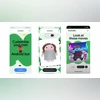
Androidify will let users create their own personalised Android bot with AI by uploading a photo, adding accessories, choosing a vibe, and bringing it to life
 "Androidify app")
Androidify app
Listen to This Article
Google is bringing back Androidify with an AI-powered update, allowing users to turn their photos into personalised Android bots. According to the Google blog, the app or the website can generate custom bots from selfies or text prompts, complete with accessories, using Gemini 2.5 Flash. The original app was retired in 2020, while a basic version was released last year. This update comes alongside the Android 16 QPR1 launch and the September 2025 Pixel Drop.
Androidify: How it works
According to Google, “Androidify uses Gemini 2.5 Flash to caption the photo, Imagen to generate your custom Android bot and in some cases, Veo 3, Google’s latest video generation model, to animate your bot with different vibes.” This combination of AI tools allows the app to generate detailed avatars, whether from a photo or a text prompt, making personalisation both fun and realistic.
Over the years, the Android mascot has appeared in a variety of playful roles, from “a Wickedly green broom mount” to “a garage band filming a music video” and even “an Oreo superhero saving the world from an asteroid.” Google emphasises, “the most important role has always been helping you express yourself, and this is just one of the many ways AI is helping us rethink creativity and individuality.”
In addition to creating static bots, Androidify also offers animation features. From September 5, users can animate their Android bots into eight-second videos. Powered by Veo 3, this feature is available to a limited number of creations, allowing users to see their bots come to life in motion.
How to create your Android bot with Androidify:
- Upload your picture – Start by uploading a selfie or any photo you want to transform into an Android bot.
- Write your prompt – Add a text prompt to guide the AI in shaping your bot’s appearance and personality.
- Add accessories – Customise your bot with fun accessories like an umbrella, goggles, or a colourful hat.
- Choose your vibe – Pick a style for your bot, such as Star Gazer, Gamer, Jetsetter, Fitness Buff, or Pool Maven, to give it a unique personality.
- Save, share, or try again – Once your bot is ready, you can save it, share it with friends, or start over if you want to try a different look or vibe.
More From This Section

 "YouTube Premium")
 "WhatsApp")
 "Samsung Galaxy Event on September 4 (Image: Samsung)")
 "PUBG Mobile 4.0 update (Image: Krafton)")
 "Google Pixel Drop")
Don't miss the most important news and views of the day. Get them on our Telegram channel
First Published: Sep 04 2025 | 3:48 PM IST