Snapchat arrives on Apple Watch: Here is everything you can do with it

Snapchat's Apple Watch app lets users view and reply to messages via text, scribble, or voice-but doesn't support sending or viewing snaps yet
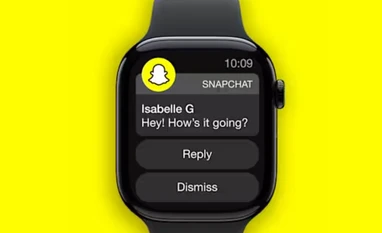
Snapchat app for Apple watch
Snapchat app for Apple watch (Image: Snapchat)
Sweta Kumari New Delhi
2 min read Last Updated : Jun 06 2025 | 10:44 AM IST
Snap has launched the Snapchat app for the Apple Watch, bringing a pared-down version of its social messaging experience to the wrist. The app focuses on quick access to messages and simplified ways to respond—but does not yet allow users to send or view snaps, which remains central to the full Snapchat experience on smartphones.

What you can do with Snapchat on Apple Watch

The Apple Watch version of Snapchat allows users to preview incoming messages directly on their watch—an improvement over the previous experience, which was limited to notification mirroring from the iPhone. 

Users can now respond using several input methods:

  • Typing on the Apple Watch’s mini keyboard
  • Scribbling characters on the screen
  • Sending emojis
  • Using voice dictation to convert speech into text
  • While photo sharing is not supported, the app improves accessibility for users who rely on wearables to stay connected throughout the day.

Snapchat on Apple Watch: Requirements

  • Supported models: Apple Watch Series 4 or newer
  • Platform: WatchOS 9 or newer
  • Phone app version: Snapchat (13.35+)

Snapchat on Apple Watch: How to set up

  • Download the app on eligible watch
  • Enabled Snapchat notifications on your Apple Watch
  • Check the Watch app on your phone to confirm that Snapchat is selected under the ‘Mirror iPhone Alerts From’ section

Snapchat on Apple Watch: How to use it

Once the app is set up on the watch, you will start receiving notifications for chat text messages. Currently, you can preview the notification by tapping on the banner or moving your wrist up for a long-look view. To reply to the message, tap on the ‘Reply’ button in the notification and respond using available methods like scribble, dictation, keyboard, or selecting a suggested reply. This will send a chat text message into the Chat.

Snapchat on Apple Watch: Limitations

  • Message preview shows only the first 100 characters of a chat text notification
  • Only new notifications will appear in preview
  • Cannot preview other chat content
Snapchat’s decision to expand to the Apple Watch comes at a time when many platforms have discontinued their wearable apps—among them Instagram, Uber, Amazon and Evernote—citing low usage or high maintenance costs.
           
*Subscribe to Business Standard digital and get complimentary access to The New York Times

Smart Quarterly

₹900

3 Months

₹300/Month

SAVE 25%

Smart Essential

₹2,700

1 Year

₹225/Month

SAVE 46%
*Complimentary New York Times access for the 2nd year will be given after 12 months

Super Saver

₹3,900

2 Years

₹162/Month

Subscribe

Renews automatically, cancel anytime

Here’s what’s included in our digital subscription plans

Exclusive premium stories online

  • Over 30 premium stories daily, handpicked by our editors

Complimentary Access to The New York Times

  • News, Games, Cooking, Audio, Wirecutter & The Athletic

Business Standard Epaper

  • Digital replica of our daily newspaper — with options to read, save, and share

Curated Newsletters

  • Insights on markets, finance, politics, tech, and more delivered to your inbox

Market Analysis & Investment Insights

  • In-depth market analysis & insights with access to The Smart Investor

Archives

  • Repository of articles and publications dating back to 1997

Ad-free Reading

  • Uninterrupted reading experience with no advertisements

Seamless Access Across All Devices

  • Access Business Standard across devices — mobile, tablet, or PC, via web or app

More From This Section

Topics :SnapchatApple WatchApple Watch app

First Published: Jun 06 2025 | 10:44 AM IST

Next Story