


Elon Musk's Grok AI gets a standalone app for iPhones: How to use, features
Musk has announced that the Grok mobile app is offering free access to the latest Grok 3 AI model for a limited time
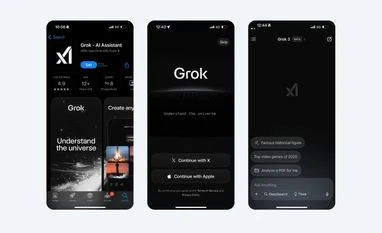 "Grok app on iOS")
Grok app on iOS
Listen to This Article
Elon Musk-owned artificial intelligence company xAI has launched a standalone app for its AI chatbot, Grok. The Grok app is now available on iOS in India via the Apple App Store, while its Android version is listed as "coming soon" on the Google Play Store. Musk has also announced that Grok will soon have standalone apps for macOS and Windows PCs.
Grok app: Features
In a post on X (formerly Twitter), Musk revealed that the Grok mobile app is offering free access to the latest Grok 3 AI model for a limited time. Grok-3, released earlier this week, is claimed to deliver over 10 times the compute power of its predecessor.
For a short time, Grok 3 is available for free to all! https://t.co/r5iLXi2pBm
— Elon Musk (@elonmusk) February 20, 2025
Beyond the new model, the mobile app introduces DeepSearch and Think mode, both powered by Grok-3:
- DeepSearch Mode: Functions as a reasoning interface, displaying how the chatbot understands a query and structures its responses.
- Think Mode: Engages Grok-3's multi-step reasoning, breaking down problems into smaller steps, evaluating solutions, and refining responses before presenting the final output.
Additionally, the Grok app allows users to generate images from text prompts and upload files and images for processing.
How to install and use Grok app on iOS
- Download the Grok app from the App Store on your iPhone.
- Open the app and sign in using your X account or Apple account.
- The app opens directly to the chat interface.
- Select "Grok 3 (Beta)" from the model picker at the top to access the latest AI model.
- Use DeepSearch and Think Mode from the text bar.
- Tap the "+" icon on the text bar to upload files and images.
- You can subscribe to the SuperGrok paid version from the Accounts section of the app.
More From This Section

 "New Instagram DM features")
 "iPhone SE (3rd gen) and new iPhone 16e")
 "Satya Nadella Majorana 1")
 "Majorana 1 chip")
 "iPhone 16e")
Topics : Elon Musk AI technology AI Models
Don't miss the most important news and views of the day. Get them on our Telegram channel
First Published: Feb 20 2025 | 3:26 PM IST