


Google's Password Manager is now available as an app, but only for Android
Google has launched a dedicated Password Manager app on Android, featuring a Material 3 redesign, cross-platform syncing via Chrome, and support for passkeys
 "Google Password Manager app")
Google Password Manager on Android
Listen to This Article
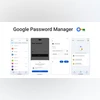
Google has rolled out a dedicated Password Manager app on Android, now available through the Play Store. The app acts as a prominent homescreen shortcut, making it easier for users to manage and locate their saved credentials.
The app’s icon features Google’s four-colour key on a white background, simply labelled Passwords. Unlike earlier shortcuts, it now appears in the app grid and device search results, offering full visibility like any standalone app.
A unified hub for credentials
Built into Android and Chrome, Google Password Manager securely stores passwords, passkeys, and network devices. It simplifies sign-ins across websites and apps, reducing the need to memorise or reuse passwords.
- Effortless sign-in: Quick and secure access across devices.
- Central management: Organise passwords, passkeys, and connected devices in one place.
- Cross-platform integration: Seamless syncing with Chrome ensures access beyond Android.
Material 3 expressive redesign
Alongside the app shortcut, Google is rolling out a Material 3 Expressive redesign for Password Manager. Key updates include:
Also Read

 "AI Mode")
 "Reddit")
 "NotebookLM's Video Overview feature")
 "AI Mode shortcut in Google Pixel")
 "Google's new shopping features")
- A pill-shaped search bar docked at the top with the Password Manager key and profile photo.
- Filters for Passwords, Passkeys, and Network devices.
- An Add password button styled with Material 3 components.
- Rounded card-style containers for each credential.
- Dynamic Colour theming, replacing the old blue accents.
- The redesign is live with Google Play services version 25.31, bringing a cleaner and more dynamic look.
Apple’s native Passwords app
Google’s move mirrors Apple’s standalone Passwords app, integrated with iCloud Keychain. Apple’s service stores and syncs credentials across iPhones, iPads, and Macs, offering features like auto-fill, password strength suggestions, and secure family sharing.
However, Apple’s app remains exclusive to its ecosystem, whereas Google Password Manager works across multiple platforms via Chrome. It is likely that Google may eventually extend the standalone app to iOS and desktop platforms, too.
More From This Section
 "My Apps in the Xbox PC app")
 "GTA$1 million bonus in GTA Online")
 "Spotify's new feature")
 "Instagram's new Link Reel feature")
 "Google Pixel 10 Pro in Obsidian colour")
Don't miss the most important news and views of the day. Get them on our Telegram channel
First Published: Aug 22 2025 | 2:25 PM IST