


Now, Google offers option on Play Store to open app soon after the download
Android users can enable auto-open in the Play Store to automatically launch newly installed apps without extra steps
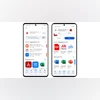 "Auto Open option in Play Store")
Auto Open option in Play Store
Listen to This Article
Google is introducing a new feature to the Play Store that allows users to “auto-open” apps immediately after the app is downloaded on Android devices. Once the toggle is enabled, the feature automatically launches an app after the download, eliminating the need to open it manually. The feature includes a brief five-second countdown notification, giving users the option to cancel if needed. The new feature is rolling out widely this week and is designed to make app installations smooth.
Google Play Store’s ‘Auto Open’ option: How it works
The new “auto-open when ready” toggle appears beneath the install progress bar as soon as a download begins. By default, the feature is turned off, so users need to manually enable it for each app they want to auto-launch. Once activated, the toggle ensures that the app opens automatically after installation, but not instantly. Instead, users receive a notification with a five-second countdown, giving them a chance to cancel the auto-open if needed.
The feature can be particularly handy for real-world scenarios. For example, if you are downloading a travel, restaurant, or event app that you will need immediately, enabling auto-open means you can continue doing other tasks, like checking messages or browsing, without forgetting to launch the app once it’s ready. It essentially removes the extra step of navigating to your app drawer after every download.
This change comes as part of Google’s ongoing effort to improve the Android user experience and make app interactions more intuitive. By letting apps open automatically when installed, users can save time and simplify workflows.
I tested the new auto-open feature on a Galaxy Z Flip 7, Google Pixel 9a, and a few other devices. The option to launch the app automatically after download appears on all, except for a few apps such as Adobe Lightroom. The feature is still rolling out, so it is possible that it will appear for all apps soon.
More From This Section

 "Apple Awe dropping event on September 9: iPhone 17 series expected")
 "Realme Concept Phones")
 "WhatsApp's new 'Writing Help' feature")
 "Redmi 15 5G smartphone")
 "BGMI")
Don't miss the most important news and views of the day. Get them on our Telegram channel
First Published: Aug 28 2025 | 4:24 PM IST