


Google might be testing circle to search-like feature for Gemini: Report
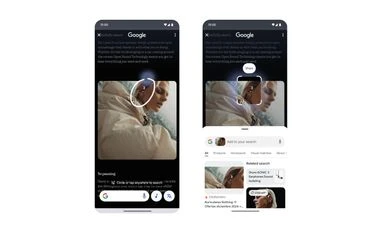
Google is reportedly testing a Circle to Search-style "circle screen" feature for Gemini, letting users highlight any on-screen content and ask follow-up questions directly
 "Circle to Search on Nothing Phone 2")
Circle to Search on Nothing Phone 2
Listen to This Article
Google is reportedly testing a Circle to Search–style tool inside the Gemini overlay for select users, allowing them to draw a circle on their screen and share the highlighted content with Gemini for follow-up questions. According to a report by Android Authority, the change brings Circle to Search’s familiar on-screen circling workflow — previously exclusive to Google Search — into the Gemini overlay.
What the Gemini integration does
The new option, reportedly named “Circle Screen,” lets users invoke the Gemini overlay, draw a circle around any part of the display, and then ask Gemini questions about the highlighted content. The workflow mirrors Circle to Search’s core idea: isolate a portion of what’s on screen and run a visual query. In Gemini’s version, users can also type their initial query after making the selection.
How this compares with existing Google tools
Circle to Search remains Google’s dedicated quick visual-search gesture, while Google Lens and Gemini Live cover related ground: Lens can analyse images and Circle to Search–style selections, and Gemini Live can analyse live camera input and on-screen content. The Gemini overlay integration does not add camera-view analysis — it simply makes on-screen searching via Gemini as straightforward as using Circle to Search, rather than replacing Lens or Gemini Live.
Also Read

 "Nothing Phone 3a Lite in White, Black and Blue colours")
 "iOS 26")
 "Opera Neon browser")
 "New Gemini-powered AI features in Google Maps (Image: Google)")
 "Google, Alphabet")
Availability
According to Android Authority, the feature is appearing for a small number of users so far. It was first noticed on a Samsung device. When Business Standard attempted to verify this independently on the Pixel 10 Pro, the feature was not available.
More From This Section
 "Apple iOS 26")
 "Battlefield 6")
 "artificial intelligence, AI,")
 "iPhone 17 Pro, MacBook Pro M5, iPhone Air, iPad Pro M5, iPhone 16 (L to R)")
 "Dell")
Topics : Google Technology News Gemini AI
Don't miss the most important news and views of the day. Get them on our Telegram channel
First Published: Nov 27 2025 | 4:09 PM IST