iOS 26: What’s new
User interface features:
- Liquid Glass design: Brings translucent layers, fluid transitions, refreshed app icons, and a redesigned lockscreen clock, plus a new “Clear” app icon style.
- Homescreen and Lockscreen: Cleaner layouts with a floating dock and broader widget and wallpaper customisation.
- Safari revamp: A translucent bottom bar that hides while scrolling to provide distraction-free browsing.
- Camera redesign: Simplified slider with two primary modes (Photo and Video), with extra options accessible via swipes.
- Photos update: Two-tab structure (Library and Collections), improved search tools, and support for spatial image conversion.
- Preview app for iPhone: Lets users edit screenshots, annotate files, and save them as PDFs, similar to the macOS version.
Apple Intelligence features:
- Live call translation: Real-time audio translation, paired with live captions and visual overlays.
- On-screen visual intelligence: Capture a screenshot and instantly search or act on content.
- Call recording: Store audio and transcripts of calls within the Notes app.
- Hold Assist: Minimises the call screen, alerts when the other party returns, and provides live transcription.
- Image Playground: AI-generated visuals in styles such as Anime, Oil Painting, and Vector, powered by ChatGPT.
- Smarter AI tools: Contextual actions, custom emoji creation, improved recognition of on-screen content, and automatic order tracking in Mail.
- Developer integration: Third-party apps can tap into Apple Intelligence with privacy measures built in.
App and system updates:
- Phone app: Merges Recents, Favourites, and Voicemails, with Call Screening and Hold Assist features integrated.
- Messages: Adds contact screening, polls, Apple Cash payments, and group typing indicators.
- Apple Games: Central hub for tracking progress, browsing titles, and accessing Apple Arcade.
- CarPlay: Updated with compact call windows, pinned chats, widget support, Live Activities, and compatibility with CarPlay Ultra.
- Apple Music: Gains AutoMix for continuous playback and translated lyrics.
- Apple Maps: Stores location history privately with encryption.
- Apple Wallet: Provides real-time travel updates for flights and transit.
- AirPods: Introduces voice isolation, studio-level recording, and a camera remote.
- Accessibility: Enhanced reader options, expanded Braille support, and improvements to Live Listen and Personal Voice.
iOS 26: How to update
- Go to Settings.
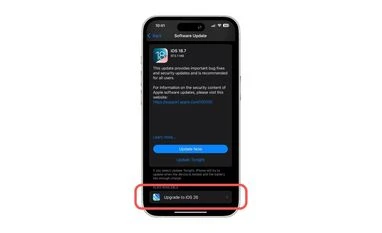
- Tap on General settings and go to the 'Software Update' section.
- Here you will see the option to install either iOS 26 or iOS 18.7 (if eligible).
- Select the version you want and tap ‘Download and Install’ to begin the process.
- After the download, choose to install immediately, schedule it for later, or select Remind Me Later.
- Tap on ‘Install Now’ to update immediately or choose other options according to your convenience.
iOS 26: Eligible models
- iPhone 17 series: iPhone 17, iPhone 17 Pro, iPhone 17 Pro Max, iPhone 17 Air
- iPhone 16 series: iPhone 16, iPhone 16 Plus, iPhone 16 Pro, iPhone 16 Pro Max, iPhone 16e
- iPhone 15 series: iPhone 15, iPhone 15 Plus, iPhone 15 Pro, iPhone 15 Pro Max
- iPhone 14 series: iPhone 14, iPhone 14 Plus, iPhone 14 Pro, iPhone 14 Pro Max
- iPhone 13 series: iPhone 13, iPhone 13 mini, iPhone 13 Pro, iPhone 13 Pro Max
- iPhone 12 series: iPhone 12, iPhone 12 mini, iPhone 12 Pro, iPhone 12 Pro Max
- iPhone 11 series: iPhone 11, iPhone 11 Pro, iPhone 11 Pro Max
- iPhone SE (2nd generation and later)
You’ve reached your limit of {{free_limit}} free articles this month.
Subscribe now for unlimited access.
Already subscribed? Log in
Subscribe to read the full story →
Smart Quarterly
₹900
3 Months
₹300/Month
Smart Essential
₹2,700
1 Year
₹225/Month
Super Saver
₹3,900
2 Years
₹162/Month
Renews automatically, cancel anytime
Here’s what’s included in our digital subscription plans
Exclusive premium stories online
Over 30 premium stories daily, handpicked by our editors


Complimentary Access to The New York Times
News, Games, Cooking, Audio, Wirecutter & The Athletic
Business Standard Epaper
Digital replica of our daily newspaper — with options to read, save, and share


Curated Newsletters
Insights on markets, finance, politics, tech, and more delivered to your inbox
Market Analysis & Investment Insights
In-depth market analysis & insights with access to The Smart Investor


Archives
Repository of articles and publications dating back to 1997
Ad-free Reading
Uninterrupted reading experience with no advertisements


Seamless Access Across All Devices
Access Business Standard across devices — mobile, tablet, or PC, via web or app
)