


Instagram launches AI Restyle tool to edit Stories with prompts, effects
Instagram launches its AI Restyle tool for Stories, letting users edit photos and videos with text prompts, presets, and creative effects directly in the app
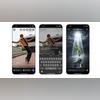 "Instagram's Restyle tool")
Instagram's Restyle tool
Listen to This Article
Instagram has rolled out a new AI-powered Restyle tool for Stories, allowing users to make advanced edits to photos and videos using Meta AI prompts and presets. According to Instagram, the feature brings generative AI editing to Instagram’s most popular format, making it easier to remove distractions, enhance visuals, or add creative effects before sharing.
A few months ago, Instagram head Adam Mosseri shared a video demo showing how the Restyle tool would let users apply AI-powered presets to videos before posting.
How the Restyle tool works
The new Restyle button appears in the top-right corner when selecting media to share as a Story.
Users can then choose from preset effects for videos or text prompts for images to guide Meta AI. For example, one can type prompts like “add a crown on top of the girl’s head” or “change the lighting to sunset glow.”
Meta said the tool supports a wide range of creative edits, from removing unwanted details to adding playful or aesthetic elements.
Also Read

 "Tech Wrap October 22")
 "Instagram's new theme icon for Teen account")
 "FameWick")
 "Tech Wrap October 16")
 "Instagram's Diwali themed effects")
Users can even change the mood or style of their Stories with a single prompt, choosing between photorealistic looks, film noir tones, or artistic themes like “outer space” or “Paris streets.”
Restyled content can be shared directly in Stories or DMs, making the editing process completely in-app and free to use.
Instagram update: What’s new
Writing better AI prompts
Instagram shared tips for getting the best results, urging users to describe subjects, lighting, composition, and mood in detail to give Meta AI better creative direction.
Add Stickers and share edits
The feature integrates with Instagram’s “Add Yours” stickers, letting users share AI-edited creations. When someone posts a restyled photo or video with this sticker, others can tap it to apply the same edits to their own media.
Meta has not confirmed the global rollout timeline, and availability may vary by region depending on where Meta AI is active.
How to restyle your photos
- Tap the “+” icon on your profile photo to select an image for your Story.
- Tap the Restyle icon in the top tray.
- Choose Add, Remove, or Change, then type your edit prompt.
- Tap Done once your new image is generated, then share your Story.
How to restyle your videos
- Tap the “+” icon on your profile photo to select a video.
- Tap the Restyle icon in the top tray.
- Choose a preset effect.
More From This Section
 "Samsung Galaxy S25 Ultra")
 "Microsoft Copilot Fall Release")
 "TP-Link")
 "Elon musk, musk, Elon")
 "Google's Bay View campus in Mountain View, California")
Don't miss the most important news and views of the day. Get them on our Telegram channel
First Published: Oct 24 2025 | 11:03 AM IST