


Microsoft adds 'Vibe Working' with Agent Mode & Office Agent in 365 Copilot
Microsoft has added Agent Mode to Excel and Word and a new Office Agent in Copilot chat, making it easier to create spreadsheets, documents, and presentations with prompts
 "Microsoft introduces ‘Vibe Working' with Agent Mode")
Microsoft introduces ‘Vibe Working’ with Agent Mode
Listen to This Article
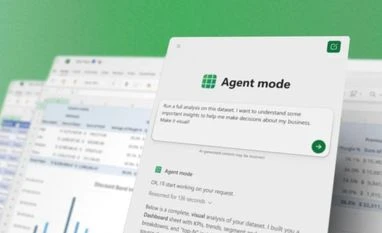
Microsoft has rolled out new AI tools for its 365 suite, adding Agent Mode in Excel and Word, along with an Office Agent in Copilot chat. Called “vibe working”, the update is designed to allow users to describe tasks in plain language while the AI handles the technical steps, from building spreadsheets to drafting documents and creating presentations. The move highlights Microsoft’s push to make productivity apps more interactive and conversational.
Agent Mode in Excel
According to the company, Agent Mode in Excel is designed to assist users who struggle with advanced formulas and data models. Instead of manually building out spreadsheets, users can simply type a request, and the AI will generate tables, calculations, or even financial models. The system does not just create outputs; it can test results, correct mistakes, and iterate until the file works as intended. Microsoft said that it effectively lowers the barrier to Excel’s more features, which are usually accessible only to experts.
Example: Give Microsoft Copilot a prompt like, “Run a full analysis on this sales data set. I want to understand some important insights to help me make decisions about my business. Make it visual.” The company said that Agent Mode determines the right formulas, generates new sheets, and creates visualisations. Copilot provides a summary of insights and validation steps for further iteration.
Agent Mode in Word
In Word, Agent Mode shifts document creation into what Microsoft calls a “vibe writing” experience. Users can ask Copilot to summarise data, draft reports, or format documents. The AI responds in real time with suggestions and clarifying questions, creating a back-and-forth process that feels more like a conversation than traditional typing. As per the company’s blog, the goal is to reduce repetitive work and let users focus on intent while Copilot handles the structure and polish.
Also Read

 "Auto-categorisation in Microsoft Photos")
 "Microsoft 12-inch Surface Pro Copilot Plus PC")
 "Qualcomm Snapdragon X2 Elite series chip")
 "Anthropic")
 "Tech Wrap September 24")
Example: Give Copilot a prompt, like “Can you clean up this document? Title case for section headers, branding updates per the ‘/Latest brand guidelines’ email, and italicise all external partner mentions. Feel free to ask if you need help identifying partners or guidelines.” According to the company blog, this is a document-style prompt designed to draft content, suggest refinements, and raise clarifying questions along the way.
Office Agent in Copilot chat
Alongside this, Office Agent in Microsoft Copilot chat adds the ability to build PowerPoint decks and Word documents directly within a chatbot interface. As per the company blog, rather than starting from scratch in PowerPoint, users can ask the Office Agent to create a presentation with a defined structure and tone.
This marks Microsoft’s latest effort to tackle one of AI’s shortcomings: creating professional-quality slides. The company claims the new model is better at generating coherent, well-designed decks that are ready to present.
Example: One can give Microsoft Copilot a prompt, like “Create a report evaluating the trends of influencer and social media advertising in the coffee industry.” This prompt is for the social media trend.
Availability of AI tool
Agent Mode for Excel and Word is now rolling out through Microsoft’s Frontier program for 365 Copilot licensed customers, as well as Personal and Family subscribers. The features currently work on the web, with desktop support expected soon. Meanwhile, Office Agent is launching for Microsoft 365 Personal and Family subscribers in the United States, limited to Copilot on the web in English for now.
More From This Section
 "iOS 26")
 "Facebook's brings Challenges, Custom Badges and more")
 "Google Pixel Watch 3")
 "WhatsApp update")
 "Pixel 10 Pro Fold")
Don't miss the most important news and views of the day. Get them on our Telegram channel
First Published: Sep 30 2025 | 2:56 PM IST