At
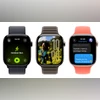
WWDC 2025, Apple unveiled the developer beta of watchOS 26, introducing a new software update to its wearable operating system. The watchOS 26 update brings a new design language, enhanced integration with Apple Intelligence, and a wide array of functional upgrades across fitness, messaging, accessibility, and developer tools.
From the debut of Liquid Glass visuals to the introduction of Workout Buddy—an AI-driven fitness companion built into the Apple Watch—the update focuses on surfacing relevant, timely information while minimising the friction of daily interactions. The Smart Stack grows smarter with context-aware prompts, messaging gains real-time translation and smarter replies, and new gesture-based controls allow for quicker, one-handed navigation.
WatchOS 26: Rollout timeline and eligible Apple Watches
The watchOS 26 developer beta is now available through the Apple Developer Programme, with a public beta scheduled for next month and general rollout expected this autumn.
Apple Watches that are eligible for this software update are:
- Apple Watch Series 6
- Apple Watch Series 7
- Apple Watch Series 8
- Apple Watch Series 9
- Apple Watch Series 10
- Apple Watch SE (2nd generation)
- Apple Watch Ultra
- Apple Watch Ultra 2
WatchOS 26: What is new
Liquid Glass design and UI overhaul
watchOS 26 debuts a vibrant new design language called Liquid Glass, bringing a dynamic, refractive effect across the interface. The Smart Stack, Control Centre, in-app navigation, and the Photos watch face now adopt this look, creating a more immersive visual experience while retaining the familiar watchOS layout.
Apple Intelligence introduces ‘Workout Buddy’
A standout feature of the update is Workout Buddy, an Apple Intelligence-powered fitness companion that provides real-time, personalised motivation based on users’ fitness history. It offers spoken encouragement mid-workout and tracks milestones like pace, heart rate, and total distance, using a generative voice modelled after Fitness+ trainers. Initially available in English, it supports popular workouts such as running, walking, cycling, strength training, and HIIT, and requires an Apple Intelligence-enabled iPhone nearby.
Workout app gets a redesign
The Workout app sees its most significant update yet, adding a four-corner button layout for quicker access to features like Custom Workouts, Pacer, and Race Route. Users can now set music and podcast preferences directly within the app, and Apple Music will suggest playlists based on the activity type and listening habits.
Smarter Smart Stack and new hints
Smart Stack becomes more proactive in watchOS 26, offering contextual hints based on user habits, location, and sensor data. Hints — rendered in Liquid Glass — might suggest opening Backtrack when in a remote area or starting a Pilates workout upon arriving at a studio.
Messaging upgrades with Live Translation and more
Messages now supports Live Translation on Apple Watch Series 9, Series 10, and Ultra 2, translating texts in real-time. The app also suggests contextual actions like Check In or Apple Cash and displays customisable backgrounds synced from the iPhone. Smart Replies are now more accurate thanks to an upgraded on-device language model.
New gesture controls and smarter notifications
A new one-handed wrist flick gesture lets users dismiss notifications, silence alarms, or reject calls with a simple motion — helpful when multitasking. The Watch also auto-adjusts notification volume based on ambient noise to minimise disruption.
Notes app, Accessibility, and more
The Notes app arrives on Apple Watch with support for pinning, unlocking, and dictating notes. New accessibility tools include Live Listen with real-time captions and remote control for audio sessions. Other additions include:
- Hold Assist and Call Screening in the Phone app.
- Smarter Photos watch face based on featured memories.
- Redesigned Watch Face Gallery for easier discovery.
- Enhanced developer tools for Smart Stack, Control Centre, and custom widgets.">/li>

 "Apple WatchOS 26: What is new, eligible models, and rollout timeline")


 Connect with us on WhatsApp