


Google app gets Pinterest-like 'Images' tab: Check what's new, availability
Google adds a new "Images" tab to its app, offering a Pinterest-like experience that helps users browse, save and organise visuals tailored to their interests.
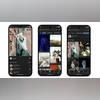 "Google's new 'Images' tab")
Google's new 'Images' tab
Listen to This Article
Google is rolling out a new “Images” tab inside the Google app, giving users a fresh way to explore and organise photos based on their interests. According to Google’s blog, the feature aims to make visual discovery easier, whether they are planning a trip, redecorating their space or picking an outfit. The update is designed to help people find inspiration more naturally, especially when they cannot describe what they are looking for but recognise it when they see it.
Similar to Pinterest, Google’s new Images tab offers a scrollable feed of photos tailored to personal interests, helping users discover, save, and organise visual ideas all in one place.
Google’s Images tab: Details
According to Google’s announcement, users will now find a new “Images” icon at the bottom of the Google app screen, alongside tabs like Home, Search, Notifications, and Activity. Tapping on it brings up a daily feed of new images curated around their interests. Users can scroll through the feed, save their favourite visuals to collections, or search for more related ideas within the app. The blog explained that this feature is designed to help users easily organise their creative inspiration from the first idea to the next project all in one place.
Also Read

 "Restore old photos using Google Gemini AI prompts")
 "AI Mode")
 "Google Search, GPT searches")
 "Google Chrome")
 "Google's 'Try it On' feature")
As reported by 9to5Google, this new tab has been in testing for several months. The feature was first spotted in May, followed by a beta rollout in June.
Google said the feature is now rolling out across the US for both Android and iOS users. When you open the “Images” tab for the first time, you will be asked to select topics you are interested in, such as travel, fashion, or home décor. Google then builds a personalised image feed using publicly available photos from Google Search.
The report also mentioned that the feature comes with handy options. Users can long-press an image to share it, save it or search for similar ones with Google Lens. They can also hide images they do not like to keep their feed more relevant.
More From This Section
 "OnePlus 15")
 "Apple iPhone Pocket")
 "Real-time AQI in Google Map")
 "Tech Wrap November 12")
 "WhatsApp")
Don't miss the most important news and views of the day. Get them on our Telegram channel
First Published: Nov 13 2025 | 10:44 AM IST