


Now you can try on shoes virtually with Google Search's 'Try It On' feature
Google's AI Try-On now includes shoes, letting users preview sneakers or heels on themselves, rolling out to select users and more regions soon
 "Google's 'Try it On' feature")
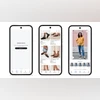
Google's 'Try it On' feature (Image: Google)
Listen to This Article
Google is expanding its AI-powered virtual try-on tool beyond clothing to include footwear. According to Google’s blog, the new feature lets users see how different pairs of shoes, from heels to sneakers, might look on them, directly within the search results. The company said that the rollout begins with select users in the US and will extend to Australia, Canada, and Japan over the coming weeks.
Google’s Try-On feature: Details
At the Google I/O event, the company highlighted its focus on AI-powered shopping, showcasing its new Try-On feature. The tool uses advanced AI perception models that understand body shapes, lighting, and depth to realistically map clothing onto a user’s full-length photo. Google said that the system maintains subtle details such as texture, folds, and proportions, creating a near-realistic preview. The feature was previously limited to clothing but now supports footwear too.
To use this feature, users can tap on any product listing on Google, select the “Try it on” button, and upload a full-length photo to see how a pair of sneakers, heels, or boots might look on them. The preview lets users compare options visually before making a purchase decision.
An example shared by Google shows a person wearing white sneakers in their photo. The AI transforms those into several shoe options, including a pair of black open-toe heels.
This rollout follows Google’s earlier virtual try-on experiments like Doppl, the experimental app launched under its Labs program, which lets users create an AI-generated version of themselves to try different outfits.
Here’s how to use Google’s new “Try It On” feature:
- Opt in – Go to Search Labs and enable the “Try It On” experiment.
- Browse – While shopping for clothing or footwear on Google, tap the “Try it on” icon on any product.
- Upload – Add a full-length photo of yourself with good lighting and fitted clothes to see how the outfit looks on you.
- Share or shop – Save your look, share it with friends, or explore similar styles.
More From This Section

 "Google Search Live, AI Mode")
 "Karwachauth AI images 2025")
 "Realme partners with Ricoh for GT 8 Pro")
 "Google Pixel 10 Pro Fold and Pixel Buds 2a")
 "Netflix")
Topics : Google Tech News Google's AI Google search engine
Don't miss the most important news and views of the day. Get them on our Telegram channel
First Published: Oct 09 2025 | 12:47 PM IST