


Explained: How to block your phone from interrupting you
On an Apple device running iOS 15, open the Settings icon and scroll to Focus; saying "Hey, Siri, open my Settings" works, too
 "phone settings")
premium
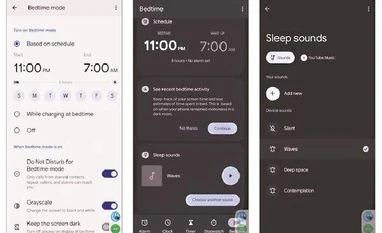
To temporarily silence most calls, go back to the main Digital Wellbeing screen and select Do Not Disturb
Sometimes, you just need to get stuff done — that budget spreadsheet, your novel or even a nap — but your smartphone insists on distracting you with notifications, texts or the pull of social media. Sure, the Do Not Disturb setting can temporarily stifle interruptions when you need quiet time or a mental break, but recent versions of Android and Apple’s new iOS 15 include a more flexible Focus mode with other tools for concentration.
Topics : smartphone Android Apple iOS