


OnePlus Pad Go 2 review: Built for multitasking with a screen made to binge
OnePlus Pad Go 2 stands out as an Android tablet built for daytime work and after hours relaxed entertainment with a large 12.1-inch display and capable MediaTek Dimensity 7300-Ultra chip
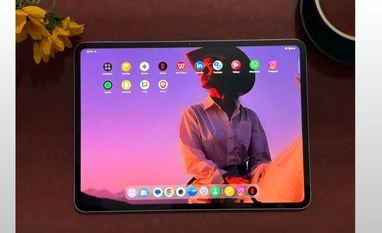 "OnePlus Pad Go 2")
OnePlus Pad Go 2 (Lavender Drift)
Listen to This Article
OnePlus has expanded its tablet lineup in India with the launch of the OnePlus Pad Go 2. Building on the foundation laid by the Pad Go, launched in 2023, the new model brings MediaTek Dimensity 7300-Ultra chipset, 12.1-inch display, and a big capacity battery with 33W wired charging support. OnePlus has also introduced a new Stylo accessory, its first on a Go-series tablet. I have been using the OnePlus Pad Go 2 as my daily tablet for work and after hours chores and I see how well it performs where it matters most.
Design
I used the OnePlus Pad Go 2 in the Lavender Drift colour, a shade that subtly changes with lighting. Indoors, it appears slightly darker, while in brighter light it reveals a soft lavender tint. The finish helps the tablet stand out in a quiet way, giving it a clean and modern look without feeling flashy.
The back side of the tablet is simple and uncluttered. The single rear camera sits neatly in the corner and does not cause the Pad Go 2 wobble when placed on a flat surface. The OnePlus logo remains centred on the back panel without drawing too much attention. Button placement is mostly practical with the power button on the top edge, which feels natural when using the tablet in landscape mode, especially during work or video playback, and volume buttons placed close to the top corner on the right side.
The soft-touch finish on the back makes a noticeable difference during long usage sessions. Whether I was reading articles, browsing the web or watching videos, the tablet felt comfortable to hold and did not slip. Fingerprints are also barely visible, likely helped by the lighter colour, which keeps the tablet looking clean even after extended use.
Also Read

 "OnePlus 15R, OnePlus Pad Go 2")
 "OnePlus 15R")
 "One X Tri-Mode Wireless Gamepad")
 "Tech Wrap December 16")
Display
Spending time with the OnePlus Pad Go 2, the display consistently held up across different tasks. Reading long articles, working on a few documents or casually scrolling felt comfortable, with text remaining sharp even at smaller sizes. Brightness was not an issue for indoor use and even near windows or in brighter environments, the screen remained readable. There is some reflection, but it did not interfere much with everyday viewing. Over longer sessions, the display stayed comfortable, which made it easy to keep using the tablet for hours at a stretch.
I enjoyed using the tablet most for watching series and movies. Shows on Netflix and YouTube looked sharp, and colours came through nicely without appearing too punchy. Dolby Vision does make a difference, especially in scenes with mixed lighting, where details remain visible instead of getting washed out. The screen also feels spacious, making it easy to get absorbed in content without constantly adjusting the view.
Open Canvas, OnePlus multitasking software, turned out to be something useful rather than just a feature I tried once and forgot about. It lets me run two apps side by side, with the option to keep a third one floating on top and after a short while, the gestures start feeling natural. A simple two-finger swipe brings up a split screen, while a four-finger pinch turns a full-screen app into a small floating window that I can move around easily.
During work, this setup genuinely made things easier. I often kept a browser open on one side while jotting down notes or collecting links on the other. At times, I had a chat window floating while comparing my social media insights or compiling links, which helped me stay on task without constantly switching apps. The large display of 12.1-inch and its aspect ratio play a big role here, making multitasking feel natural whether the tablet is in portrait or landscape. It is one of those features that quietly improves your workflow and keeps you engaged once you start using it.
Camera, speakers and connectivity
The OnePlus Pad Go 2 comes with an 8MP rear camera and an 8MP front-facing camera for video calls and occasional photos. Both cameras handle everyday tasks reliably, such as online webinars, document scanning and quick captures. Image quality is decent for a tablet, with focus generally doing its job, though it can take a moment in some situations. The tablet supports 1080p video recording at 30fps, which is suitable for video calls and casual recordings. I also used the rear camera for barcode scanning and it worked well as expected.
The OnePlus Pad Go 2 comes with a quad-speaker setup, with two speakers placed at the top and two at the bottom. While watching multiple series on the tablet, the audio consistently felt immersive, delivering an almost theatre-like experience. Voices are easy to hear, music does not get mixed up, and there is enough bass to make the sound feel full. In regular use, the volume is strong enough to comfortably fill a medium-sized room, making headphones unnecessary for casual viewing or binge-watching.
That said, speaker placement does have a small practical drawback. When using the tablet without a cover in landscape mode, it is quite easy to partially cover one speaker on each side with your palms. I noticed this a few times while watching episodes, where my grip slightly muffled the sound. Although the remaining speakers are loud enough that the audio does not collapse completely, you do lose a bit of balance. Once you adjust your grip or place the tablet on a table or stand, the sound opens up again and feels full and enjoyable.
Battery
Battery life is one of those things you only notice when it goes wrong, and that rarely happens here. The tablet’s large 10,050mAh battery feels built for long days. I used it for work, watching videos, browsing, and even some light gaming, often switching between tasks without worrying about plugging it in. Whether my usage was heavy or light, the battery stayed dependable and never felt like a limitation. Even during longer sessions, the tablet did not heat up, which made the experience more comfortable.
Charging takes around two hours with the 33W fast charger. It is not the fastest and I did feel it could have been a bit quicker, but once the tablet is fully charged, it lasts long enough that the waiting does not feel like a big issue. A nice extra is reverse charging support, which helped me top up my phone when it was about to die.
I usually keep my screen brightness quite high, both indoors and outdoors, and that does drain the battery slightly faster. Still, even with that habit, the tablet managed to keep going through the day. Overall, the battery experience is reassuring. It quietly does its job in the background, letting you focus on what you are doing rather than constantly checking the battery percentage.
Software and Performance
In daily use, the tablet feels consistently smooth and easy to live with. Apps open quickly, switching between them is fluid and scrolling feels nice. Even with the tablet set to its highest refresh rate mode and certain apps manually pushed to 120Hz, the experience stays stable and responsive. Whether I was browsing, writing, watching videos or juggling multiple apps at once, everything ran comfortably without breaking the flow.
On the software side, the experience stays clean and easy to understand. The interface is simple and it did not take much time to get used to the gestures and features. Multitasking tools feel thoughtfully integrated rather than forced. Features like quick app switching, floating windows and split screen actually made my workflow easier instead of complicating it.
Along with multitasking, I also tried out the AI features that OnePlus has added, and some of them fit nicely into daily use. I found the new Translate app useful since it handles text, voice and visual translation in one place, so I did not have to jump between different apps. I also used Gemini Live with screen sharing that came in handy when I needed quick help on screen. Inside the Notes app, the smart formatting and AI assistance helped keep things organised without extra effort.
Stylo and Folio case
Using the OnePlus Pad Go 2 Stylo feels very natural, almost like picking up a pen and starting to write. There is no noticeable delay, so notes and sketches flow easily. The soft tip also helps, especially during longer writing sessions, and my hand never felt tired. I often used the corner swipe or the screen off tap when an idea came up suddenly. It is genuinely useful when you do not want to unlock the tablet or search for an app. I used this during calls and while reading, just to jot things down quickly.
Switching tools is simple. A tap to erase, another to change colours, and you are back to writing. The shortcut button came in handy too, especially for grabbing parts of a document or a slide and dropping them straight into my notes. The battery on the Stylo easily kept up with my usage. Although I did not use it for a very long period, the battery experience was still reassuring. Even a short top-up was enough to get through.
The Notes app makes the whole experience better. Handwritten notes can be turned into text, which helps clean things up later. The handwriting improvement feature is subtle but nice. Overall, the Stylo does not feel like an extra accessory. It feels like something you end up using daily.
The OnePlus Pad Go 2 Folio case is a simple way to protect the tablet, though it does add a bit of weight. It wraps around the device neatly and feels comfortable to hold during reading or browsing. The cover also works as a stand, but only in landscape mode, which is useful for watching videos, typing, or video calls. Overall, it helps protect the tablet from everyday scratches and minor bumps while adding some everyday convenience.
Verdict
The OnePlus Pad Go 2 strikes a nice balance between getting things done and switching off when you want to relax. For productivity, the large display and Open Canvas make multitasking feel natural, whether you are researching, writing, or juggling a few apps at once. Add the Stylo to the mix and it becomes even more useful for notes, ideas, and quick edits. The smooth performance and clean software keep everything moving without distractions, so work never feels like a chore.
When it’s time to unwind, the tablet easily turns into an entertainment hub. The spacious screen pulls you into movies and shows, the speakers add to the experience, and the long battery life lets you binge or scroll without watching the clock. What makes the Pad Go 2 stand out is how effortlessly it switches between these two roles.
OnePlus Pad Go 2: Variants and pricing
- 8GB RAM + 128GB storage (Wi-Fi only): Rs 26,999
- 8GB RAM + 256GB storage (Wi-Fi only): Rs 29,999
- 8GB RAM + 256GB storage (WiFi + Cellular): Rs 32,999
- Colour: Lavender Drift, Shadow Black
Notably, the OnePlus Pad Go 2’s Wi-Fi + Cellular variant will only be available in Shadow Black colour.
OnePlus Pad Go 2: Unboxing
More From This Section
 "Vivo X300 smartphone in Elite Black colourway")
 "Philips Air Purifier AC4221")
 "Lava Agni 4")
 "OPPO Enco Buds 3 Pro Plus")
 "Vivo X300 Pro in Dune Gold colourway")
Don't miss the most important news and views of the day. Get them on our Telegram channel
First Published: Dec 18 2025 | 3:19 PM IST