


Adobe Project Indigo app now supports iPhone 17 series, but no selfies yet
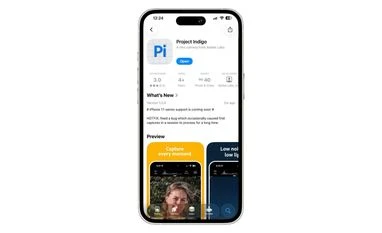
Adobe's Project Indigo app is now functional on the iPhone 17 lineup after weeks of incompatibility, though the company has disabled the front camera until Apple's iOS 26.1 update
 "Adobe's Project Indigo")
Adobe's Project Indigo
Listen to This Article
Adobe has announced that its Project Indigo app is now supported on Apple’s iPhone 17 series. For weeks after the launch of the iPhone 17 series, the app remained unfunctional on the latest iPhones. According to a report by The Verge, Adobe was having trouble adapting to the square-shaped front camera sensor, introduced with the latest generation of iPhones.
After resolving some part of the problem, Adobe has made Project Indigo functional for the iPhone 17 series, but it has disabled support for the front-facing camera for now. According to the company, it will be enabled only after Apple releases the iOS 26.1 public update.
Project Indigo’s difficulty with iPhone 17 series
According to the Adobe Community forum, the company acknowledged ongoing issues preventing its Indigo camera app from functioning on Apple’s new iPhone 17 models. It further announced that the fix for this issue has been made by Apple in the iOS 26.1 update; however, till then, the front camera will be disabled in Indigo.
Adobe wrote, “Hello everyone - thank you for your patience while you wait for the iPhone 17 support. We are working hard on it, and we have run into some issues, especially with the front camera. Some of them we flagged to Apple, who have made a fix and will ship it with iOS 26.1. Sadly, that means we need to consider disabling the front camera in Indigo until that version of iOS is shipped.”
On the Apple App Store, Adobe also acknowledged certain other issues, including:
Also Read

 "Adobe's Project Indigo")
 "Google Gemini Nano Banana model in Adobe Photoshop app")
 "Tech Wrap September 5")
 "Adobe Premiere: Video Editor")
 "Adobe Acrobat Studio")
- Issues with very noisy captures in Photo mode in low light if the ISO is high. The company suggested using Night mode to capture such scenes or lowering the ISO to 500 or below.
- Auto exposure may flicker in Photo mode in low-light conditions.
- 4x telephoto images on the iPhone 17 Pro and Pro Max may exhibit a brighter band towards the bottom of the image.
- To address some of the issues, the company also made some improvements with iOS 26 compatibility on all devices.
Project Indigo improvements
- Adobe on the Apple App Store highlighted the improvements made in the new update and wrote:
- The Exposure compensation slider now works when rotated into landscape orientation.
- TipKit no longer obscures the filmstrip in landscape orientation.
- Filmstrip gestures now work correctly on iOS 26.
- Fixed a rare memory leak when the app is backgrounded during preview.
- The number of frames slider now has haptic feedback. Fixed an issue where certain Pro Controls are not respected if the individual component's UI is not visible. Fixed an issue where newly captured photos cannot be shared from the filmstrip.
Adobe’s Project Indigo app: Supported Apple iPhone models
- iPhone 17 series
- iPhone 16 series
- iPhone 15 series
- iPhone 14 series
- iPhone 13 Pro and iPhone 13 Pro Max
- iPhone 12 Pro and iPhone 12 Pro Max
What is Project Indigo
Adobe said that Project Indigo was built to produce natural, DSLR-style photos with minimal software interference, appealing to users who prefer authentic tones and lighting instead of the automatic enhancements applied by Apple’s default camera app.
According to the company, Indigo avoids the heavy use of computational effects such as artificial sharpening, smoothing, or colour boosting, instead focusing on accurate exposure, realistic colour balance, and fine texture. The goal, Adobe noted, is to capture scenes as they appear in real life rather than generating an overly processed image.
Positioned as a tool for photographers who want greater creative control, Project Indigo offers a simplified interface and a more natural shooting experience. The app is currently exclusive to iOS, but Adobe has indicated that an Android release could follow in the future.
Project Indigo: Key features
Adobe listed key features of the Project Indigo app on the Apple App Store. These include:
- Multiple capture: Rather than clicking just one shot, the app captures a burst of photos for every capture pressed. It combines those pictures together to produce a high-quality photo with lower noise and higher dynamic range.
- Natural look: Indigo uses computational photography and AI to produce photos with a natural, DSLR-like appearance. This includes subtle but deliberate processing for subjects and skies. The look is applied when generating JPEG images and also embedded as a rendering suggestion in RAW DNG files (if enabled). All raw pixel data remains unchanged — the look does not modify the actual image data.
- Pro controls: Indigo offers full manual control over image capture settings, including focus, exposure time, ISO, exposure compensation, and white balance. Focus control provides an optional magnified loupe for precise adjustment, while white balance can be set by tapping on a neutral grey object. The Night mode allows users to manually choose how many frames are aligned and merged into a final photo — more frames reduce noise but increase capture time. A Long Exposure mode is also available when the device is mounted on a tripod, enabling synthetic long exposure effects such as “water-into-silk,” with the camera continuously capturing and merging frames until the user stops the process.
- Super-resolution for zoom: Digital zoom typically leads to a loss in image quality. To counter this, Indigo applies multi-frame super-resolution technology that restores much of the lost detail. When active, the ‘SR’ indicator appears on the zoom buttons.
- Macro mode: Enabling Macro mode from the viewfinder allows users to capture detailed close-up shots with enhanced clarity and precision.
- Viewfinder: The viewfinder displays all active camera parameters, a live histogram, zebra stripes highlighting overexposed areas, and a level indicator to assist in capturing straight and properly aligned images.
- Lightroom integration: Indigo includes direct integration with Adobe Lightroom Mobile, allowing users to send images directly from the Indigo filmstrip to the Lightroom app for further editing. Additionally, Indigo’s optional RAW DNG files ensure maximum compatibility with Adobe Lightroom and Photoshop for professional post-processing.
- Technology previews: Indigo also serves as a platform for early previews of new technologies that may later appear in Adobe’s flagship products or exist in modified forms within them.
- AI Denoise: One of these previews includes an AI-based denoising feature derived from Adobe Camera Raw and Lightroom desktop. It requires a RAW DNG input and produces a new DNG file saved to the camera roll.
- Remove reflections: Another preview feature adapts Adobe’s AI-based Remove Reflections technology from Camera Raw and Lightroom desktop. It processes DNG inputs and saves a medium-resolution JPEG to the camera roll, designed to reduce reflections when shooting through glass that covers most of the camera’s field of view.
More From This Section
 "New Lock Glimpse feature on Nothing Phone 3a series with NothingOS 4.0 open beta")
 "Oppo deepens partnership with Google Gemini for ColorOS 16")
 "artificial intelligence, AI Models")
 "Xiaomi")
 "Cyber Security")
Don't miss the most important news and views of the day. Get them on our Telegram channel
First Published: Oct 27 2025 | 1:57 PM IST