


Spotify tests Audiobook Recaps so you can jump back in without re-listening
Spotify's new AI-powered Audiobook Recaps feature provides brief catch-ups so listeners can return to long titles after breaks without losing track of the story
 "Spotify's new feature (Audiobook Recap)")
Spotify's new feature (Audiobook Recap)
Listen to This Article
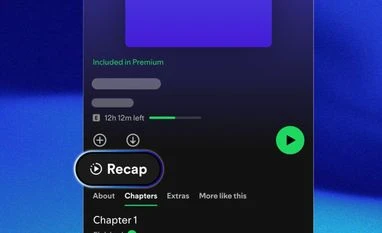
Spotify is testing a new tool called Audiobook Recaps on iOS. According to the company’s blog, the feature is meant to help listeners quickly remember what happened in the part of the audiobook they last heard. Many users pause long audiobooks for days or weeks, and this tool aims to make it easier to continue without re-listening to large sections.
Recaps are available only in beta and work on a small number of English titles. It is available only to select iOS users. Spotify said it will expand the feature over time.
Spotify’s Audiobook Recaps: How it works
According to the blog, the Recaps feature creates short audio summaries based on the portion of the book a listener has already heard. It works like the “previously on” segment that appears before many TV episodes. The company said, “Designed to reduce friction and keep you immersed, Recaps are part of our ongoing effort to make audiobook listening more seamless, intuitive, and listener-friendly.” The idea is to give listeners a simple way to rejoin the story after a break, especially when the plot or characters are hard to recall.
Spotify said Recaps appear only after a user has listened to at least 15 to 20 minutes of a book. After that, the summaries update as the listener moves through the chapters. The Recap button shows up at the top of the audiobook’s page, and tapping it plays a short description of what has happened so far. The summaries are designed to avoid spoilers and do not cover parts of the book a user has not reached.
Also Read

 "Spotify")
 "Spotify music sharing")
 "Spotify's 'Listening Stats' feature")
 "Tech Wrap October 28")
 "Spotify")
According to the company, Recaps use AI to help listeners catch up, but the original work remains protected. Spotify mentioned that it does not use audiobook recordings for AI training or voice generation, and the Recaps do not copy the narrator’s voice or replace the full audiobook.
Spotify updates Shuffle
Spotify has also made several changes to how Shuffle works. According to the company, Premium users can now turn off Smart Shuffle if they don’t want extra recommendations mixed into their playlists. Both Free and Premium users can tap any song during shuffle and play it next without changing the whole queue. The default Shuffle has been updated to repeat fewer songs by avoiding tracks you listened to recently, which helps playlists feel less repetitive. For those who prefer the older style with more randomness, Premium users can switch back to Standard Shuffle in the settings.
More From This Section
 "iQOO 15, OnePlus 15 and Realme GT 8 Pro")
 "Google Pixel")
 "Group chat in ChatGPT")
 "OpenAI, chatgpt")
 "Tech Wrap November 13")
Topics : Tech News Spotify Audio companions
Don't miss the most important news and views of the day. Get them on our Telegram channel
First Published: Nov 14 2025 | 12:26 PM IST